
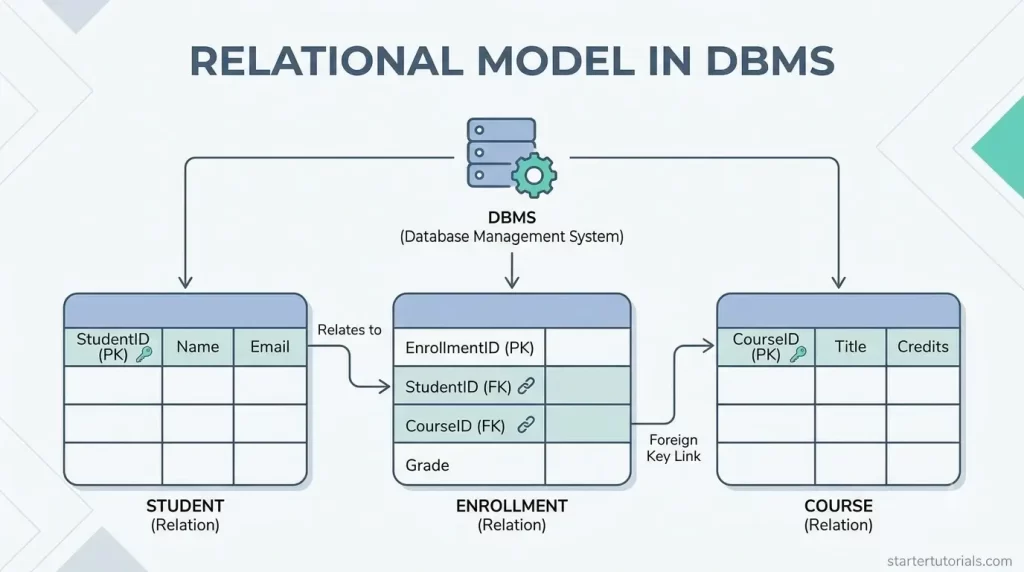
Managing massive amounts of data efficiently requires a clear, reliable structure. The relational model in DBMS provides this foundation by organizing complex information into straightforward, interconnected tables.
As the standard architecture for modern Relational Database Management Systems (RDBMS), this data organization model relies on clear relationships, keys, and logical rules to keep data secure and easy to access.
Whether you are learning relational database concepts for the first time or designing your own tabular database structure, understanding how the relational model functions in database management systems is essential for building fast, scalable applications.
Introduction to relational model
The relational model is a simple way of organizing and managing data using tables, much like spreadsheets with rows and columns. Introduced by Edgar F. Codd in 1970, it breaks down information into separate, clear tables called relations where each row represents a single record (like a specific customer) and each column represents an attribute (like a customer’s name or phone number).
What makes it “relational” is its ability to connect these different tables using shared identifiers called keys. This setup prevents data duplication, ensures information stays consistent, and allows you to easily search and recombine data from multiple tables using languages like SQL.
Basic concepts in relational model
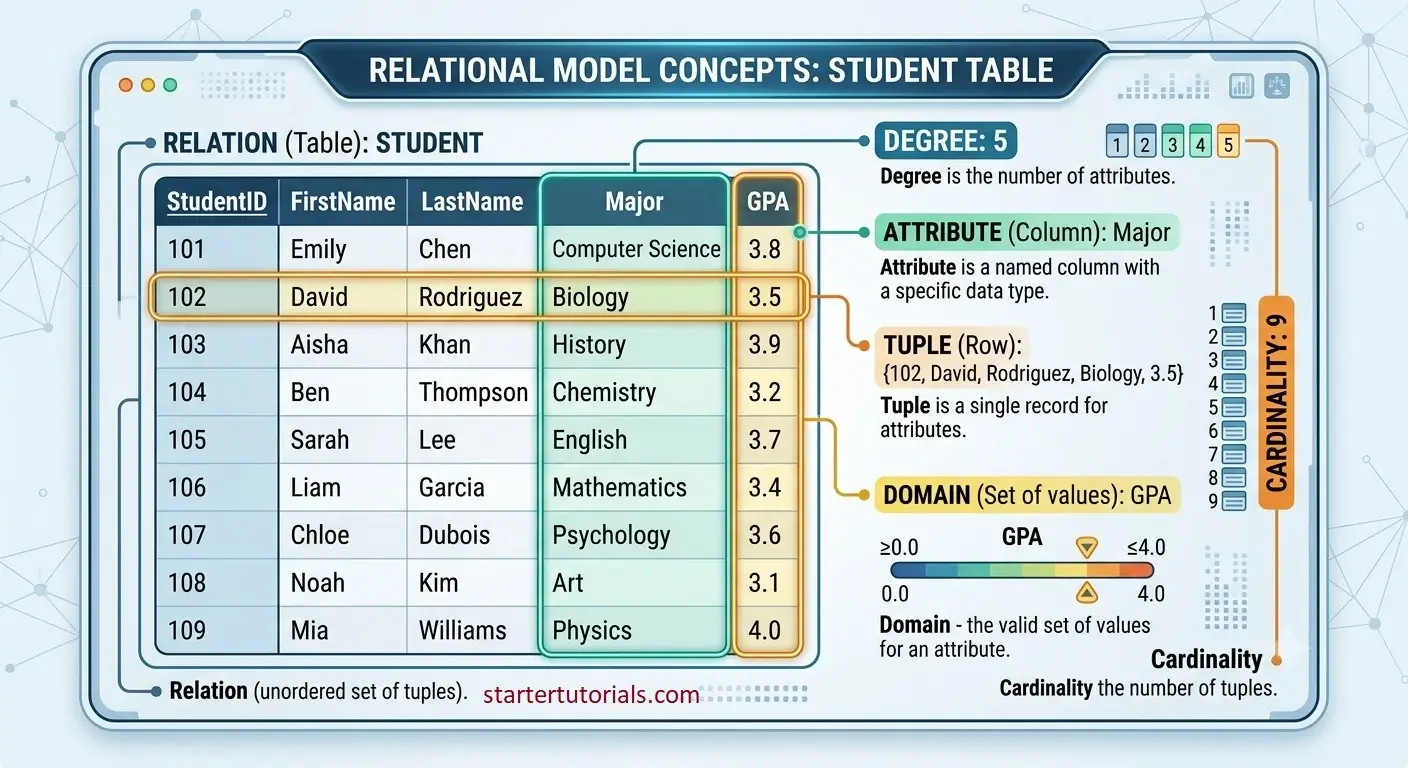
The fundamental concepts in relational model are:
- Relation (Table): A two-dimensional grid used to store data. Each relation represents a specific entity (like Students or Orders).
- Attribute (Column): A named column in a table that represents a specific property or characteristic of the data (e.g., Email, Age, Price).
- Tuple (Row/Record): A single row in a table containing a set of related data values for one specific item or entity.
- Domain: The set of all permissible values that can be entered into a specific attribute (e.g., a Grade column might only accept letters A through F).
- Degree: The total number of attributes (columns) in a relation.
- Cardinality: The total number of tuples (rows) currently stored in a relation.
Let’s take a Student table and understand the fundamental concepts of a relational model as illustrated in the image below:
In a relational model, there are different types of keys to maintain uniqueness and to enforce some types of constraints. The different types of keys are:
- Primary Key: A unique identifier chosen for each row in a table (e.g., StudentID). It can never contain null or duplicate values.
- Foreign Key: An attribute in one table that links to the primary key of another table, creating a parent-child or master-slave relationship between them.
- Candidate Key: Any attribute (or set of attributes) capable of uniquely identifying a row. The primary key is selected from these.
- Super Key: Any combination of attributes that uniquely identifies a row, which may include extra, non-essential attributes.
To maintain the integrity of data in tables, we need integrity constraints. Constraints are simply rules that enforces the integrity of the data. Different types of integrity constraints are:
- Entity Integrity: Ensures that primary keys cannot be null, guaranteeing that every record remains uniquely identifiable.
- Referential Integrity: Ensures that foreign key values must match an existing primary key in the related table (or be null), keeping connected data synchronized.
- Domain Constraints: Ensures all values entered into an attribute strictly adhere to its defined data type and allowed values.
Relational model for a university database
To enforce the above concepts, let’s consider a university database as an example. The relations or table in the database are:
Student
| Student_ID | Student_Name | Dept_ID |
|---|---|---|
| S5001 | Alice Johnson | D101 |
| S5002 | Bob Smith | D101 |
| S5003 | Charlie Brown | D102 |
| S5004 | Diana Prince | D102 |
| S5005 | Evan Wright | D103 |
| S5006 | Fiona Gallagher | D104 |
| S5007 | George Clark | D105 |
| S5008 | Hannah Abbott | D106 |
| S5009 | Ian Malcolm | D107 |
| S5010 | Julia Roberts | D109 |
Primary key: Student_ID
Foreign key: Dept_ID
Professor
| Prof_ID | Prof_Name | Dept_ID |
|---|---|---|
| P1001 | Dr. Alan Turing | D101 |
| P1002 | Dr. Grace Hopper | D101 |
| P1003 | Dr. Nikola Tesla | D102 |
| P1004 | Dr. James Watt | D103 |
| P1005 | Dr. Isambard Brunel | D104 |
| P1006 | Dr. Carl Gauss | D105 |
| P1007 | Dr. Richard Feynman | D106 |
| P1008 | Dr. Marie Curie | D107 |
| P1009 | Dr. Rosalind Franklin | D108 |
| P1010 | Dr. Adam Smith | D109 |
Primary key: Prof_ID
Foreign key: Dept_ID
Department
| Dept_ID | Dept_Name |
|---|---|
| D101 | Computer Science |
| D102 | Electrical Engineering |
| D103 | Mechanical Engineering |
| D104 | Civil Engineering |
| D105 | Mathematics |
| D106 | Physics |
| D107 | Chemistry |
| D108 | Biology |
| D109 | Economics |
| D110 | Business Administration |
Primary key: Dept_ID
Foreign key: None
Course
| Course_ID | Course_Name | Dept_ID |
|---|---|---|
| CS101 | Data Structures | D101 |
| CS102 | Operating Systems | D101 |
| EE201 | Circuit Analysis | D102 |
| EE202 | Digital Signal Processing | D102 |
| ME301 | Thermodynamics | D103 |
| CE401 | Structural Engineering | D104 |
| MA101 | Calculus I | D105 |
| PH101 | General Physics | D106 |
| CH101 | Organic Chemistry | D107 |
| EC201 | Microeconomics | D109 |
Primary key: Course_ID
Foreign key: Dept_ID
Enrollment
| Enrollment_ID | Student_ID | Course_ID |
|---|---|---|
| E9001 | S5001 | CS101 |
| E9002 | S5001 | CS102 |
| E9003 | S5002 | CS101 |
| E9004 | S5003 | EE201 |
| E9005 | S5004 | EE202 |
| E9006 | S5005 | ME301 |
| E9007 | S5007 | MA101 |
| E9008 | S5008 | PH101 |
| E9009 | S5009 | CH101 |
| E9010 | S5010 | EC201 |
Primary key: Enrollment_ID
Foreign key: Student_ID, Course_ID
Advantages of relational model
The relational model revolutionized database management by solving many of the rigid, complex issues of earlier systems. Here are its main advantages explained simply:
- Simple and intuitive structure: Data is organized into simple, two-dimensional tables (rows and columns) that mimic everyday spreadsheets. This makes it easy for both developers and non-technical users to understand and query.
- Minimal data redundancy: By splitting data into separate tables and linking them using keys, you avoid repeating the same information over and over. This saves storage space and prevents conflicting information.
- High data integrity: Built-in constraints (like Primary and Foreign Keys) enforce strict rules. For example, you cannot assign a student to a department ID that doesn’t exist, ensuring data remains accurate and trustworthy.
- Structural and physical data independence: The physical storage of data (where and how files are saved on a disk) is separated from its logical design (tables and columns). You can change hardware or index structures without breaking the applications using the database.
- Powerful querying (SQL support): It uses standard query languages like SQL to retrieve, filter, and manipulate data easily. You don’t need to write complex programs or specify physical storage paths—you just specify what data you want.
- Security and access control: Administrators can easily grant or restrict permissions down to specific tables, rows, or columns, ensuring sensitive data (like grades or salary details) is seen only by authorized users.
- Flexibility and scalability: Adding new tables, relationships, or attributes to an existing database is straightforward and usually does not disrupt existing queries or software applications.
Disadvantages of relational model
While the relational model is widely used, it comes with several trade-offs:
- High hardware and storage costs: Maintaining complex table relationships, indexes, and continuous integrity checks requires powerful hardware with significant memory and processing capability.
- Performance drops with huge data: As databases grow into millions or billions of rows, running complex queries that join multiple large tables together can drastically slow down system response times.
- Rigid schema design: You must define the exact structure (tables, columns, and data types) before entering any data. Modifying this structure later on a live, large-scale database can be difficult and disruptive.
- Impedance mismatch (object-relational mismatch): Modern applications are written using Object-Oriented Programming (OOP), where data is stored in complex, nested objects. Mapping these objects into flat relational tables often requires complex extra code or tools (ORMs).
- Difficult horizontal scaling (sharding): Relational databases excel at vertical scaling (adding more CPU/RAM to a single server). However, splitting a relational database across dozens of separate servers (horizontal scaling) while maintaining strict ACID guarantees and foreign key links is extremely complex.
- Inefficient for unstructured data: It is designed strictly for clean, structured data. Storing unstructured or rapidly changing data—like social media posts, JSON documents, or multimedia files—is cumbersome and inefficient compared to modern NoSQL databases.

Mr. P.S.Suryateja, also known as Suryateja Pericherla, is at present a Research Scholar (full-time Ph.D.) in the Dept. of Computer Science & Systems Engineering at Andhra University, Visakhapatnam. Previously worked as an Associate Professor in the Dept. of CSE at Vishnu Institute of Technology, India.
He has 14+ years of teaching experience and is an individual researcher whose research interests are Cloud Computing, Internet of Things, Computer Security, Network Security and Blockchain.
He is a member of professional societies like IEEE, ACM, CSI and ISCA. He published several research papers which are indexed by SCIE, WoS, Scopus, Springer and others.
Leave a Reply