
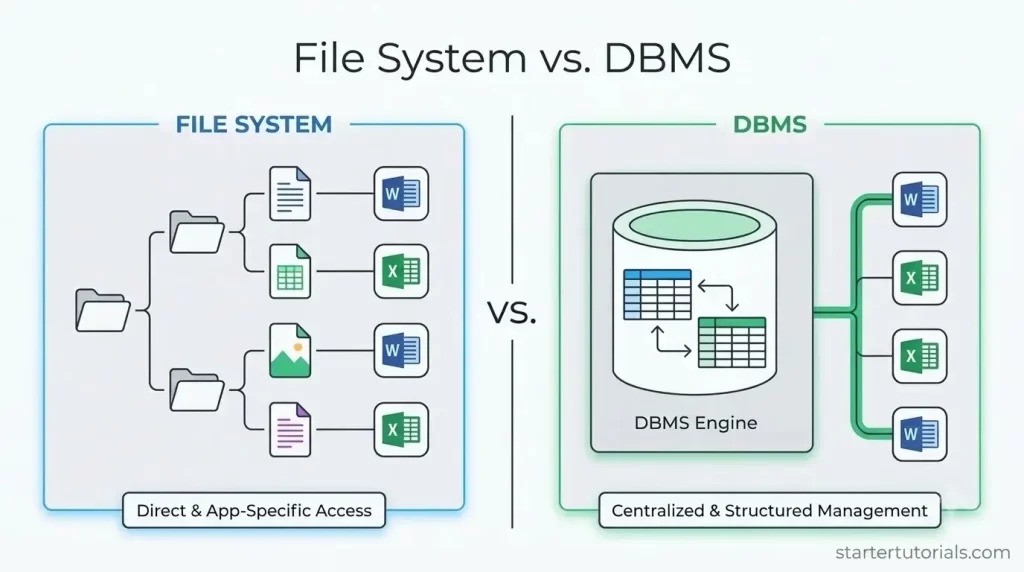
Every modern application from a simple mobile app to a massive enterprise system relies on one fundamental component: data. But where and how should that data actually live? At first glance, saving information in simple text files managed by your operating system might seem like the easiest approach. However, as applications scale and data grows more complex, file systems quickly reveal critical limitations. This is where a Database Management System (DBMS) comes in.
Before diving into the details, let’s look at a quick side-by-side comparison of how file system and DBMS handle data management in a tabular format:
File Systems vs. DBMS: Key Differences
| Factor | Plain Text File System | Database Management System (DBMS) |
|---|---|---|
| 1. Data Redundancy & Inconsistency | High Risk: Data is duplicated across multiple application files. Updating information in one file leaves others outdated, causing conflicting records. | Normalized: Eliminates redundancy through data normalization. Information is stored in a single central location and referenced elsewhere via foreign keys. |
| 2. Data Access | Complex & Inflexible: Requires writing custom file-parsing scripts (e.g., Python, C) for every new retrieval or filtering request. | Ad-hoc Queries: Provides high-level declarative query languages (SQL) to extract and manipulate data instantly without custom software logic. |
| 3. Data Isolation | Scattered & Unstandardized: Data is fragmented across disjointed files, varying directories, and incompatible formats (CSV, fixed-width, binary). | Unified Schema: Centralizes data under a single schema with standardized data types (e.g., VARCHAR, INT), enabling seamless integration. |
| 4. Integrity Problems | Application-Dependent: Business rules and constraints are hardcoded into specific application programs. New scripts can bypass checks and corrupt data. | Central Constraints: Enforces declarative integrity constraints (NOT NULL, CHECK, FOREIGN KEY) directly within the database schema. |
| 5. Atomicity Problems | Partial Execution Risk: Multi-step operations can fail mid-way due to system crashes, leaving files in a partially updated, corrupted state. | ACID Compliance: Guarantees atomicity via transaction processing ('all or nothing'). Automatic ROLLBACK restores state upon failure. |
| 6. Concurrent Access | Lost Updates: Simultaneous updates by multiple users result in race conditions where the last saved file overwrites prior edits without warning. | Concurrency Control: Uses locking mechanisms and isolation levels (e.g., MVCC) to manage concurrent transactions safely without data loss. |
| 7. Security Problems | Coarse Access Control: Security is restricted to operating system file-level permissions (all-or-nothing read/write access to the entire file). | Fine-Grained Granularity: Provides granular Role-Based Access Control (RBAC) down to specific tables, columns, or dynamic views. |
Disadvantages of file system
As you can see, storing data in plain text files have several disadvantages. They are as follows:
- Data redundancy and inconsistency
- Difficulty in accessing data
- Data isolation (data scattered across files and in different formats)
- Integrity problems (constraints)
- Atomicity problems
- Concurrent-access anomalies
- Security problems
University database: A case study
To understand the disadvantages of storing data in text files (maintained by the file system) and the advantages of storing that data in a DBMS, let’s take the help of a university database as a case study.
Consider an example of university that maintains information about:
- Instructors
- Students
- Departments
- Course offerings
We can store this data in files maintained by the operating system. Also, the system provides various application programs to manipulate the data, like:
- Add new students, instructors, and courses
- Register students for courses and generate class rosters
- Assign grades to students, compute grade point averages (GPA), etc
The system stores permanent records in various files, and it needs different application programs to extract records from, and add records to, the appropriate files.
Now, let’s learn about each disadvantage of storing data in files and how a DBMS overcomes them.
Data redundancy and inconsistency
Plain Text Example: A student’s home address and department name might be duplicated across multiple files (e.g., Students.txt, Enrollments.txt, and TuitionFees.txt). If the student updates their home address in Students.txt, but TuitionFees.txt is not updated, the system holds conflicting data (inconsistency), wasting disk space and causing errors (redundancy).
DBMS Solution: Data normalization structures tables to eliminate duplicate fields. A student’s address is stored once in a central Student table. Other tables reference it using a primary key (Student_ID). Updating the address in one place reflects everywhere immediately.
Difficulty in Accessing Data
Plain Text Example: The Registrar needs a list of all students taking “CS101” taught by “Dr. Smith”. In a file system, a programmer must write a custom script (e.g., in C or Python) to open files, read each line, parse strings, and filter rows. If the Dean later asks for students with a GPA greater than 3.5 in the same course, another separate program must be written.
DBMS Solution: Relational databases provide a high-level query language like SQL. Users or applications can query complex relationships on the fly in seconds without custom code:
SELECT Student_Name
FROM Enrollments
WHERE Course_ID = 'CS101' AND GPA > 3.5;
Data Isolation
Plain Text Example: The Computer Science department stores instructor data in a comma-separated file (instructors.csv), while the Mathematics department uses fixed-width text files (math_professors.dat). Matching instructors with their assigned course offerings across departments requires writing complex custom translation routines to reconcile differing file structures.
DBMS Solution: A DBMS provides a unified data schema. All departments store entity records in standardized, central tables governed by consistent data types (e.g., VARCHAR, INT, DATE), making cross-departmental operations seamless.
Integrity Problems
Plain Text Example: University policy dictates that a student cannot register for a course if their GPA is less than 2.0, or that an instructor’s salary must be greater than $30,000. In plain text files, these integrity constraints are hardcoded into specific application code. If a new application bypasses these checks or if rules change, invalid data (e.g., negative GPA or blank instructor ID) gets written directly to the file.
DBMS Solution: Constraints are declared directly within the database schema using declarative constraints (NOT NULL, CHECK, FOREIGN KEY). The DBMS automatically rejects any transaction violating these rules:
ALTER TABLE Student ADD CONSTRAINT chk_gpa CHECK (GPA >= 0.0 AND GPA <= 4.0);
Atomicity Problems
Plain Text Example: A student pays a fee to add a new course offering. This requires two steps: (1) deducting the balance in Student_Financials.txt and (2) appending the row in Enrollments.txt. If the power cuts out right after step 1, the student loses money without getting enrolled in the course, leaving the system in an inconsistent state.
DBMS Solution: DBMS engines enforce ACID properties (specifically Atomicity—the “all or nothing” principle). Operations are wrapped in Transactions. If a failure occurs halfway, the DBMS automatically executes a ROLLBACK to restore the database to its clean state prior to the start of the transaction.
Concurrent-Access Anomalies
Plain Text Example: Two department coordinators simultaneously open Course_Offerings.txt to modify the max seat capacity of “CS101” (currently set to 30). Coordinator A reads 30 and changes it to 35. Coordinator B reads 30 and changes it to 40. Whichever coordinator saves last overwrites the other’s edit without realizing it (Lost Update Problem).
DBMS Solution: A DBMS employs Concurrency Control Mechanisms (such as row-level locking or multi-version concurrency control/MVCC). When Coordinator A updates a row, the database locks that row until the transaction commits, ensuring Coordinator B works with the updated data.
Security Problems
Plain Text Example: A university employee needs access to Instructors.txt to update office hours. Because access control in operating systems is enforced at the file level, giving the employee read access to Instructors.txt exposes all confidential fields in that file, including instructor salaries and social security numbers.
DBMS Solution: DBMS provides fine-grained access control (Role-Based Access Control) down to specific tables, columns, or views:
GRANT SELECT (Instructor_Name, Office_Number) ON Instructors TO Department_Staff;
Due to these disadvantages, it is better to store the data/information in a DBMS.

Mr. P.S.Suryateja, also known as Suryateja Pericherla, is at present a Research Scholar (full-time Ph.D.) in the Dept. of Computer Science & Systems Engineering at Andhra University, Visakhapatnam. Previously worked as an Associate Professor in the Dept. of CSE at Vishnu Institute of Technology, India.
He has 14+ years of teaching experience and is an individual researcher whose research interests are Cloud Computing, Internet of Things, Computer Security, Network Security and Blockchain.
He is a member of professional societies like IEEE, ACM, CSI and ISCA. He published several research papers which are indexed by SCIE, WoS, Scopus, Springer and others.
Leave a Reply