
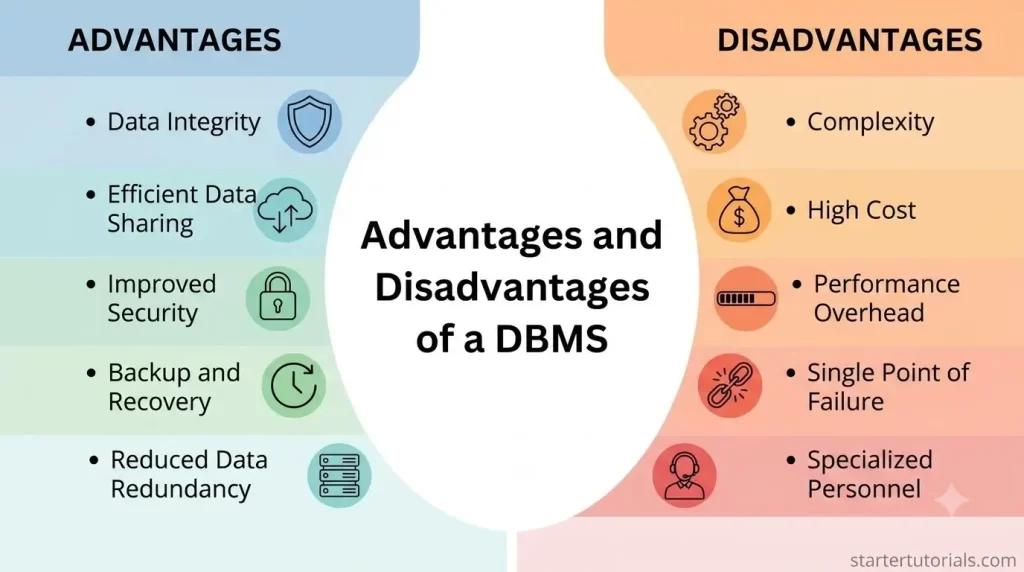
Managing enterprise data efficiently requires a robust architecture that goes far beyond traditional file storage. A Database Management System (DBMS) provides the infrastructure needed to ensure data integrity, high-speed querying, concurrent multi-user access, and fault tolerance. However, transitioning to a DBMS also introduces software complexity, resource overhead, and specialized administrative requirements. This tutorial breaks down the primary advantages and disadvantages of a DBMS, supported by a step-by-step university case study to illustrate why modern applications rely on centralized database management.
Advantages of a DBMS
DBMS offers the following advantages over a traditional file system:
- Data independence (no need to worry about the data format & storage)
- Efficient data access (from physical storage)
- Data integrity and security (constraints and access control)
- Data administration
- Concurrent access and crash recovery
- Reduced application development time
Understand advantages of a DBMS: A case study
To understand the advantages of storing that data in a DBMS, let’s take the help of a university database as a case study.
Consider an example of university that maintains information about:
- Instructors
- Students
- Departments
- Course offerings
Now, let’s learn about each advantage of storing data in a DBMS.
Data independence
The Concept: Separates the application programs from how the data is physically stored or formatted.
University Case Study:
- Suppose the university decides to change how student phone numbers are stored (e.g., splitting a single string into Country_Code and Mobile_Number) or moves student record files from an old disk drive to a high-speed SSD storage array.
- In a File System: Every application (the student portal, grading software, tuition billing system) would crash until developers rewrote the code to match the new file structure or file path.
- In a DBMS: The underlying physical storage and schema can change without breaking the applications. The web portal still queries SELECT Phone FROM Students without caring where or how those bytes are physically organized on disk.
Efficient data access
The Concept: Provides optimized searching, indexing, and querying mechanisms so you don’t have to scan through entire files sequentially.
University Case Study:
- Imagine looking up a specific student’s transcript out of 50,000 enrolled students.
- In a File System: An application must open a massive text or CSV file and read line-by-line from top to bottom until it finds Student ID S10243.
- In a DBMS: Indexes (like B-Trees) are automatically built on primary keys like Student_ID. The DBMS can locate and retrieve the specific record instantly in time, saving enormous amounts of processing time and memory.
Data integrity and security
The Concept: Enforces business rules (constraints) to keep data accurate while restricting unauthorized access.
University Case Study:
- Integrity Constraints: A course grade must be between 0.0 and 4.0, and every Student_ID in an enrollment table must correspond to an actual student in the Students table (referential integrity).
- Security & Access Control:
- A Student can view their own grades but cannot view other students’ grades or alter course schedules.
- An Instructor can enter grades for courses they teach but cannot view tuition payment details.
- A Department Admin can add new course offerings but cannot change a student’s GPA directly.
- In a file system: File permissions are usually “all-or-nothing” (you can either read the file or you can’t), making fine-grained security nearly impossible.
- In a DBMS: A DBMS prevents invalid data from ever being saved. Provides fine-grained security control via Role-Based Access Control (RBAC).
Data administration
The Concept: Centralizes data management, eliminating redundancies and making maintenance easier for Database Administrators (DBAs).
University Case Study:
- In a file system: The Finance Department and the Academic Department might maintain separate files containing student addresses. If a student moves, one file gets updated while the other stays outdated (causing data inconsistency).
- In a DBMS: Provides a single, centralized source of truth. When a student updates their address in the database once, the Change is instantly reflected across all departments: Finance, Library, Registrar, and Housing.
Concurrent access and crash recovery
The Concept: Handles multiple simultaneous users seamlessly without data corruption and restores data safely if system failures occur.
University Case Study:
- Concurrent Access: On course registration day, thousands of students try to enroll in CS101 at the exact same second. A DBMS uses concurrency control mechanisms (like locking and transactions) to ensure the system doesn’t overbook a class with a capacity of 30 students to 50 students.
- Crash Recovery: If the server loses power midway through enrolling a student and generating their tuition bill, the DBMS uses write-ahead logging () to either completely finish the transaction or roll it back entirely (ACID properties). This prevents partial, corrupted states (e.g., a student registered for a class but without a tuition record).
Reduced application development time
The Concept: Developers write high-level query languages (like SQL) rather than low-level file manipulation logic.
University Case Study:
- If the Dean requests a report of “All Computer Science students with a GPA above 3.5 who are enrolled in Fall 2026 courses”:
- In a File System: A developer would need days to write a complex program in C++ or Java to open multiple files (Students.txt, Departments.txt, Enrollments.txt), parse strings, manually cross-reference IDs, filter GPAs, handle edge cases, and output the result.
- In a DBMS: A developer writes a simple 5-line SQL query using JOIN and WHERE clauses in under 2 minutes:
SELECT s.Student_Name, s.GPA

FROM Students s

JOIN Departments d ON s.Dept_ID = d.Dept_ID

JOIN Enrollments e ON s.Student_ID = e.Student_ID

WHERE d.Dept_Name = 'Computer Science'

  AND s.GPA > 3.5

  AND e.Semester = 'Fall 2026';
Disadvantages of a DBMS
Although a DBMS offers various advantages over file systems, it has its own disadvantages. They are:
- Complex software
- Initial cost and hardware requirements
- Specialized training
- Not suitable for tight real-time applications
- Performance degradation for simple applications
Let’s understand about each disadvantage in more detail.
Complex software
A DBMS is a large, highly intricate system with numerous functionalities that require careful design, database modeling, and constant tuning. Incorrect configuration or poor schema design can lead to massive system inefficiencies and data management errors.
Initial cost and hardware requirements
Acquiring enterprise DBMS software licenses can be extremely expensive, often requiring significant capital investment. Additionally, DBMS applications demand high-performance hardware, extra memory, and substantial storage capacity to run efficiently.
Specialized training
Operating, optimizing, and maintaining a DBMS requires skilled professionals, such as Database Administrators (DBAs) and specialized developers. Organizations must invest heavily in employee training or hire expensive technical talent to manage the system.
Not suitable for tight real-time applications
DBMS features like transaction logging, concurrency control, and integrity checking introduce processing overhead and unpredictable response latencies. High-frequency trading or embedded control systems require deterministic, sub-millisecond speeds that standard DBMS architecture cannot guarantee.
Performance degradation for simple applications
For straightforward applications with single-user access or minimal data, the overhead of a DBMS outweighs its benefits. A basic file system will run significantly faster and require far fewer resources than executing queries through a full database management engine.
Although a DBMS has its own disadvantages, its advantages are far more beneficial for storing and maintaining data.

Mr. P.S.Suryateja, also known as Suryateja Pericherla, is at present a Research Scholar (full-time Ph.D.) in the Dept. of Computer Science & Systems Engineering at Andhra University, Visakhapatnam. Previously worked as an Associate Professor in the Dept. of CSE at Vishnu Institute of Technology, India.
He has 14+ years of teaching experience and is an individual researcher whose research interests are Cloud Computing, Internet of Things, Computer Security, Network Security and Blockchain.
He is a member of professional societies like IEEE, ACM, CSI and ISCA. He published several research papers which are indexed by SCIE, WoS, Scopus, Springer and others.
Leave a Reply