
Mastering database design is the most critical first step in building fast, scalable, and reliable applications. Whether you are crafting a simple data model, establishing a robust relational schema, or planning your system’s underlying database architecture, how you organize and structure your information dictates how smoothly your system will run.
In this comprehensive guide, you will learn what database design is, why designing a database properly matters, the step-by-step process of turning real-world requirements into code, and how to navigate common schema design challenges.
What is database design?
Database design is the process of organizing, structuring, and storing data so that it is easy to access, manage, and keep accurate.
Think of it like designing a digital filing system or a highly organized physical library. If you just throw papers into a giant box, finding what you need later will take hours, and you will likely lose important documents. Proper database design ensures every piece of information has a specific, logical spot.
Why database design is required?
Database design is required because without a plan, data quickly becomes chaotic, duplicate, slow to search, and prone to errors.
Imagine trying to run a massive supermarket using a single paper notebook where workers randomly write down sales, inventory, and customer info. Finding a simple total would take hours, and entries would get lost or repeated.
The main reasons why a database design in required are:
- Eliminates Duplicate Data (Saves Space): Without good design, the same information gets typed over and over. Good design stores a customer’s address once and links to it, saving space and avoiding conflicting records.
- Prevents Data Errors & Confusion: If a customer changes their phone number, a well-designed database updates it in one place. A poorly designed database requires updating it everywhere, leading to mismatching and outdated records.
- Keeps Search Speed Fast: Properly structured tables with clear index pathways allow a system to search through millions of items and give you results in milliseconds instead of minutes.
- Protects Sensitive Information: Good design lets you lock down specific tables or fields. For instance, staff can view product lists, but only finance can view credit card details.
- Prevents Accidental Deletions: In bad designs, deleting a simple entry (like an old product) might accidentally delete important related records (like past sales receipts). Design rules protect vital history.
Steps in database design
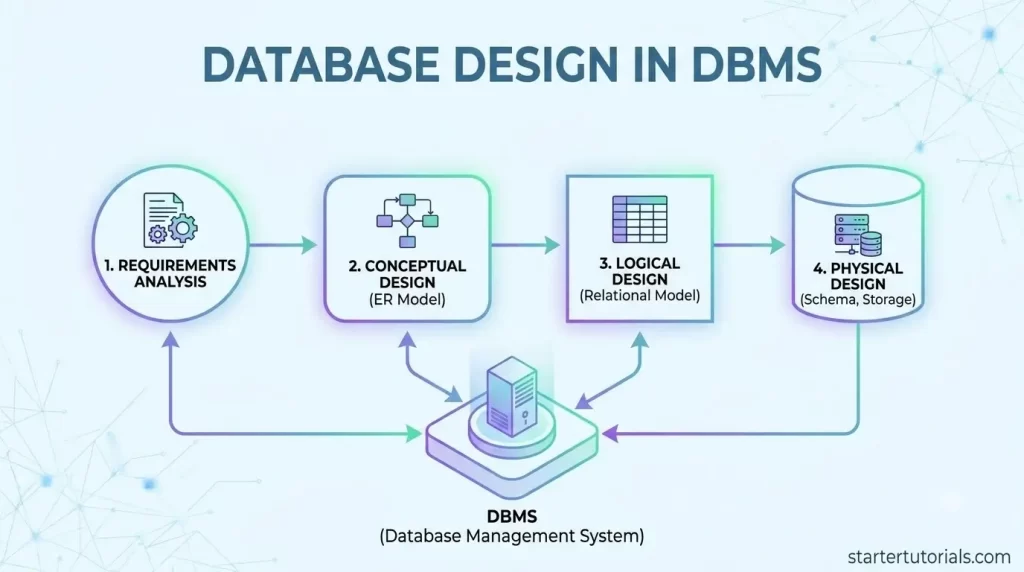
Database design happens in 4 main phases or steps, moving from high-level real-world ideas down to the technical code run by a computer. They are:
- Requirements Gathering (What do we need?)
- Conceptual Design (The big-picture blueprint)
- Logical Design (Tables, columns, and connections)
- Physical Design (Storage, speed, and computer setup)
Think of it like building a custom house: you talk about what you need, draw a blueprint, create detailed technical schematics, and finally lay the bricks.
Let’s understand about each of the steps in database design in more detail.
Step 1: Requirements gathering
First step in designing a database application is requirements analysis.
Before designing anything, you must understand what the system needs to do and what data must be tracked.
- Goal: Talk to users, managers, and clients to list all necessary information.
- Analogy: Making a wish list of rooms and features before building a home.
Step 2: Conceptual design
The information gathered in requirements analysis phase helps to develop a high-level description of the data known as conceptual design. The conceptual design is often carried out using the ER (Entity-Relationship) model which describes the data at a high level of abstraction.
Turn the requirements into a simple, visual diagram called an Entity-Relationship (ER) Diagram.
- Goal: Identify the main objects (Entities) and how they connect to each other (Relationships).
- Analogy: Drawing a basic floor plan showing where rooms go and how doors connect them.
Step 3: Logical design
Take the visual blueprint (ER diagram) and translate it into a formal structure of Tables, Columns, and Keys.
- Goal: Define exact rules, add unique IDs (Primary Keys), link tables (Foreign Keys), and apply Normalization to remove duplicate data.
- Analogy: Designing the exact dimensions of every room, specifying electrical outlets, and ensuring no wasted space.
The next step in design process is schema refinement which refines the relations taking integrity constraints into account (includes normalization).
Step 4: Physical design
Implement the logical structure inside a specific DBMS (like MySQL, PostgreSQL, or Oracle) and optimize it for speed and storage.
- Goal: Choose data types (numbers, text, dates), set up indexes for faster searching, and configure security permissions.
- Analogy: Building the house using concrete, wood, and wiring, making sure the foundation is sturdy.
Database design example
Let’s understand the actual process or steps in database design with the help of a university database as an example. Building a university database involves moving from raw requirements to a fully functioning system across four key phases.
Step 1: Requirements gathering example
In this phase, you talk to the university administration, professors, and students to list everything the system must track.
- Main Objects: Students, Professors, Courses, and Departments.
- Key Questions:
- What info do we keep for a student? (Name, DOB, Major).
- Can a professor teach multiple courses?
- Can a student enroll in more than one course?
Step 2: Conceptual design example
Next, draw an Entity-Relationship (ER) Diagram to visually map out these real-world objects (Entities) and how they connect (Relationships).
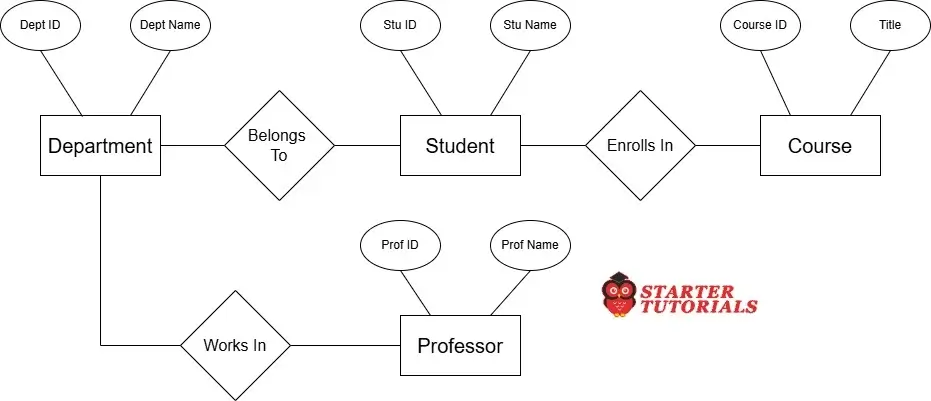
- Entities: Student, Course, Professor, Department
- Relationships:
- A Student enrolls in one or more Courses.
- A Professor teaches specific Courses.
- Both belong to a specific Department (e.g., Computer Science).
Step 3: Logical design example
Translate that visual blueprint into actual spreadsheet-like tables, assigning unique IDs (Primary Keys) and linkage IDs (Foreign Keys) to connect them efficiently without storing duplicate data. The sample table structures are given below:
Student
| Column Name | Key Type | Data Type | Description |
|---|---|---|---|
| Student_ID | Primary Key (PK) | Varchar | Unique ID for the student |
| Student_Name | - | Varchar | Full name of the student |
| Dept_ID | Foreign Key (FK) | Varchar | Links student to their major department |
Department
| Column Name | Key Type | Data Type | Description |
|---|---|---|---|
| Dept_ID | Primary Key (PK) | Varchar | Unique code for the department (e.g., CS) |
| Dept_Name | - | Varchar | Full name (e.g., Computer Science) |
Professor
| Column Name | Key Type | Data Type | Description |
|---|---|---|---|
| Prof_ID | Primary Key (PK) | Varchar | Unique ID for the professor |
| Prof_Name | - | Varchar | Name of the professor |
| Dept_ID | Foreign Key (FK) | Varchar | Links professor to their Department |
Course
| Column Name | Key Type | Data Type | Description |
|---|---|---|---|
| Course_ID | Primary Key (PK) | Varchar | Unique ID for the course (e.g., CS101) |
| Course_Name | - | Varchar | Title of the course |
| Dept_ID | Foreign Key (FK) | Varchar | Links course to the department offering it |
Enrollment
| Column Name | Key Type | Data Type | Description |
|---|---|---|---|
| Enrollment_ID | Primary Key (PK) | Varchar | Unique ID for the enrollment record |
| Student_ID | Foreign Key (FK) | Varchar | Connects to the Student table |
| Course_ID | Foreign Key (FK) | Varchar | Connects to the Course table |
Step 4: Physical design example
Finally, write code to create these tables in database software (like MySQL or PostgreSQL), choosing precise data rules to maximize performance and security.
- Data Types: Set Student_ID as a fixed 4-character string (CHAR(4)), Credits as a whole number (INT), and Grade as a single character (VARCHAR(2)).
- Speed Optimization: Add a fast-search index on the Email column so searching among 50,000 students takes less than a millisecond.
- Security Permissions: Configure settings so students can view their own grades in Enrollments, but only professors can edit them.
Challenges in database design
Designing a database is a delicate balancing act. Making a change in one area often creates a problem in another. Here are the main challenges designers face:
Balancing speed vs. storage
To make searches lightning-fast, you often need extra indexes or duplicate data (denormalization). However, adding those requires more disk space and slows down write operations (adding, updating, or deleting data). Optimizing for fast reading often hurts fast writing.
Changing business requirements
Real-world needs constantly change. A university might suddenly decide that students can have multiple majors, or a store might start selling subscriptions instead of one-time items. Modifying an active database schema without breaking existing applications or losing historical data is extremely difficult.
Understanding what users actually need
In the initial planning phase, clients or managers often struggle to explain their workflows clearly, or they forget edge cases. If you misinterpret a business rule during design (e.g., assuming one customer can only have one shipping address), fixing it later requires rebuilding entire sections of the database.
Preventing data redundancy without making tables too complex
“Normalization” splits data into smaller tables to prevent duplicate information. However, splitting data into too many tables forces the database to perform complex, resource-heavy “JOIN” operations just to fetch a simple report.
Managing security and access controls
Different users need different levels of access. Keeping sensitive data (like financial records or SSNs) locked down tight while making sure legitimate users can get their work done without constant permission errors is a requirement.
Ensuring scalability for future growth
A database design that works flawlessly for 1,000 users might completely collapse when traffic grows to 1,000,000 users. Architecting table relationships, IDs, and partition strategies early on so the system can scale smoothly without needing a complete overhaul later.

Mr. P.S.Suryateja, also known as Suryateja Pericherla, is at present a Research Scholar (full-time Ph.D.) in the Dept. of Computer Science & Systems Engineering at Andhra University, Visakhapatnam. Previously worked as an Associate Professor in the Dept. of CSE at Vishnu Institute of Technology, India.
He has 14+ years of teaching experience and is an individual researcher whose research interests are Cloud Computing, Internet of Things, Computer Security, Network Security and Blockchain.
He is a member of professional societies like IEEE, ACM, CSI and ISCA. He published several research papers which are indexed by SCIE, WoS, Scopus, Springer and others.
Leave a Reply