
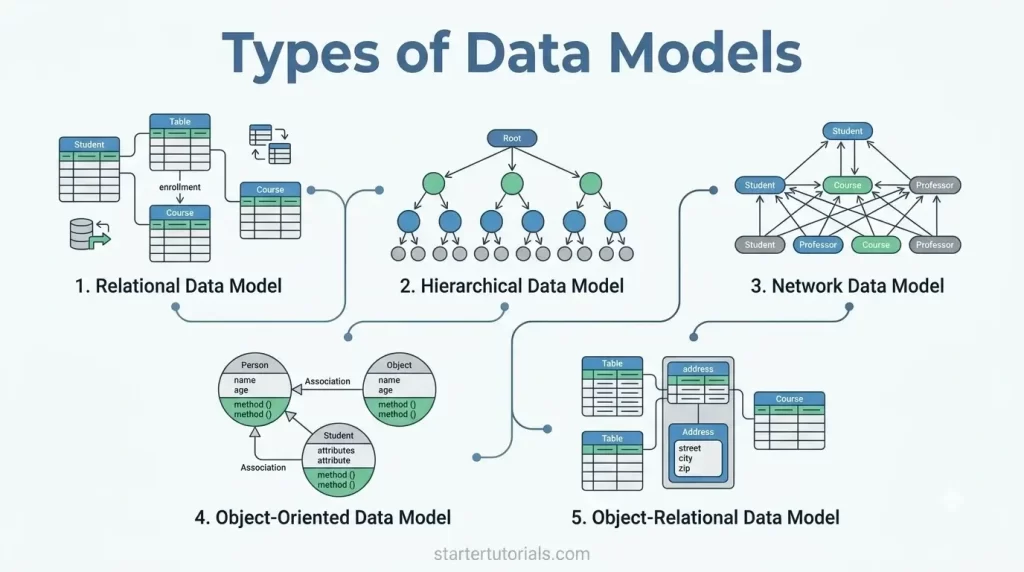
When building a database, how you structure and organize your information shapes everything from query speed to overall system flexibility. In a Database Management System (DBMS), choosing the right structure begins with understanding the different types of data models. These logical frameworks define how data elements relate to one another, how records are stored, and how constraints are enforced.
From traditional relational structures to modern object-oriented approaches, various DBMS data modeling paradigms offer unique ways to represent complex real-world data. Whether you are dealing with rigid hierarchical trees or flexible graph-like networks, exploring the main data model categories will help you select the ideal architectural foundation for your specific application requirements.
Different types of data models
In a Database Management System (DBMS), a data model defines the logical structure, relationships, constraints, and flow of data within a database.
Based on how a data model structures and organizes the data records, there are different types of data models (logical). They are:
- Relational data model
- Hierarchical data model
- Network data model
- Object-oriented data model
- Object-relational data model
Let’s explore about each type of data model in detail.
Relational data model
The most widely used data model, proposed by E.F. Codd in 1970.
- Structure: Data is organized into two-dimensional tables called Relations, consisting of rows (tuples) and columns (attributes).
- Key Characteristic: Uses key constraints (Primary Key, Foreign Key) to link tables and maintains integrity via ACID properties. Querying is done via SQL.
- Use Case: Financial applications, enterprise ERPs, MySQL, PostgreSQL, Oracle, SQL Server.
- Pros & Cons: High flexibility, easy querying, strong data consistency; can become slow with massive scales or unstructured data.
Hierarchical data model
Organizes data into a tree-like structure with a single root and child nodes.
- Structure: One-to-Many () relationships.
- Key Characteristic: Each parent node can have multiple child nodes, but a child node can have only one parent.
- Use Case: XML/JSON data parsing, directory structures, early IBM IMS databases.
- Pros & Cons: Simple to search along a branch; rigid, duplicate data if a record belongs to multiple parents.
Network data model
An evolution of the hierarchical model that allows a child node to have multiple parent nodes, creating a graph-like structure.
- Structure: Many-to-Many () relationships.
- Key Characteristic: Uses pointers or sets to link records directly.
- Use Case: Integrated Data Store (IDS), legacy banking/inventory systems.
- Pros & Cons: Handles complex relationships efficiently; setup and navigation are complex and hard to modify.
Object-oriented data model
Combines traditional database concepts with Object-Oriented Programming (OOP) principles.
- Structure: Data and its associated operations (methods) are encapsulated together into Objects.
- Key Characteristic: Supports OOP concepts like inheritance, encapsulation, abstraction, and polymorphism.
- Use Case: CAD/CAM software, real-time multimedia systems, spatial databases.
- Pros & Cons: Seamless integration with object-oriented languages (Java, C++); steep learning curve, less standardized query languages.
Object-relational data model
A hybrid model that overlays object-oriented features onto a standard relational database framework.
- Key Characteristic: Allows custom data types, arrays, composite attributes, and methods while retaining SQL compatibility and tabular structures.
- Use Case: PostgreSQL, Oracle DB (using custom types and spatial extensions).
The differences between different data models in DBMS can be summarized as shown in the table below:
| Data Model | Structure | Key Characteristic | Use Case | Pros & Cons |
|---|---|---|---|---|
| Relational Data Model | Organized into two-dimensional tables (relations) of rows (tuples) and columns (attributes). | Uses primary and foreign key constraints to link tables; queried using standard SQL and enforces strict ACID properties. | Financial applications, enterprise ERP systems, relational databases (e.g., MySQL, PostgreSQL, Oracle). | Pros: High flexibility, standardized querying, strong data integrity. Cons: Performance can degrade with massive scale or unstructured data. |
| Hierarchical Data Model | Organized into a strict top-down tree-like structure with a single root. | 1:N (One-to-Many) relationships where each parent node can have multiple child nodes, but a child node can have only one parent. | XML/JSON data parsing, file directory structures, legacy IBM IMS databases. | Pros: Simple and fast searching along a specific hierarchical path. Cons: Rigid structure; leads to duplicate data if a child belongs to multiple parents. |
| Network Data Model | Graph-like structure composed of records linked together. | M:N (Many-to-Many) relationships where child nodes can have multiple parent nodes connected via direct pointers or sets. | Integrated Data Store (IDS), legacy banking systems, complex inventory systems. | Pros: Efficiently represents complex multi-parent relationships without data redundancy. Cons: High schema complexity; navigation and modifications require managing intricate pointer paths. |
| Object-Oriented Data Model | Encapsulated objects containing both data attributes and associated operations/methods. | Directly supports core OOP concepts such as inheritance, encapsulation, abstraction, and polymorphism within the database. | CAD/CAM software, real-time multimedia systems, geographic information systems (GIS). | Pros: Seamless integration with object-oriented programming languages. Cons: Steep learning curve; lacks a universally standardized query language like SQL. |
| Object-Relational Data Model | Hybrid structure overlaying object-oriented features onto standard relational tables. | Extends relational databases by allowing user-defined composite data types, arrays, nested tables, and methods while retaining SQL compatibility. | Modern object-relational databases (e.g., PostgreSQL, Oracle DB with custom types/spatial features). | Pros: Combines tabular reporting/SQL simplicity with the modeling flexibility of OOP. Cons: Increased system complexity and potential performance overhead compared to pure relational models. |
Examples of real-world Database Management Systems (DBMS) that use the above data models is given in the table below:
| Data Model | Representative DBMS Examples |
|---|---|
| Relational Data Model | - MySQL - PostgreSQL - Microsoft SQL Server - Oracle Database - SQLite |
| Hierarchical Data Model | - IBM Information Management System (IMS) (The primary commercial hierarchical DBMS) - Windows Registry (Operates on a hierarchical key-tree database model) |
| Network Data Model | - Integrated Data Store (IDS) - IDMS (Integrated Database Management System) - Raijin DB / TurboIMAGE (Legacy enterprise databases) |
| Object-Oriented Data Model | - db4o (Database for Objects) - ObjectStore - Versant Object Database - Objectivity DB |
| Object-Relational Data Model | - PostgreSQL (Offers native support for JSON, custom composite types, and methods) - Oracle Database (Supports object types, REFs, and nested tables) - IBM DB2 |
Finally, ER model is also a data model but is a higher-level representation of the data using visual notation (diagrams).
Data models: A case study
Let’s solidify our understanding of the data models with the help of a university database. Here is how a University Database would be represented across each of the data models discussed:
Representation using relational data model
Data is divided into distinct, normalized tables and linked using primary and foreign keys.
Student table
| StudentID (PK) | Name | |
|---|---|---|
| 101 | Alice Vance | alice@univ.edu |
| 102 | Bob Smith | bob@univ.edu |
Course table
| CourseID (PK) | Title | Credits |
|---|---|---|
| CS101 | Intro to Computer Science | 4 |
| MATH201 | Linear Algebra | 3 |
Enrollment table
| EnrollmentID (PK) | StudentID (FK) | CourseID (FK) | Semester | Grade |
|---|---|---|---|---|
| E-001 | 101 | CS101 | Fall 2026 | A |
| E-002 | 101 | MATH201 | Fall 2026 | B+ |
| E-003 | 102 | CS101 | Fall 2026 | A- |
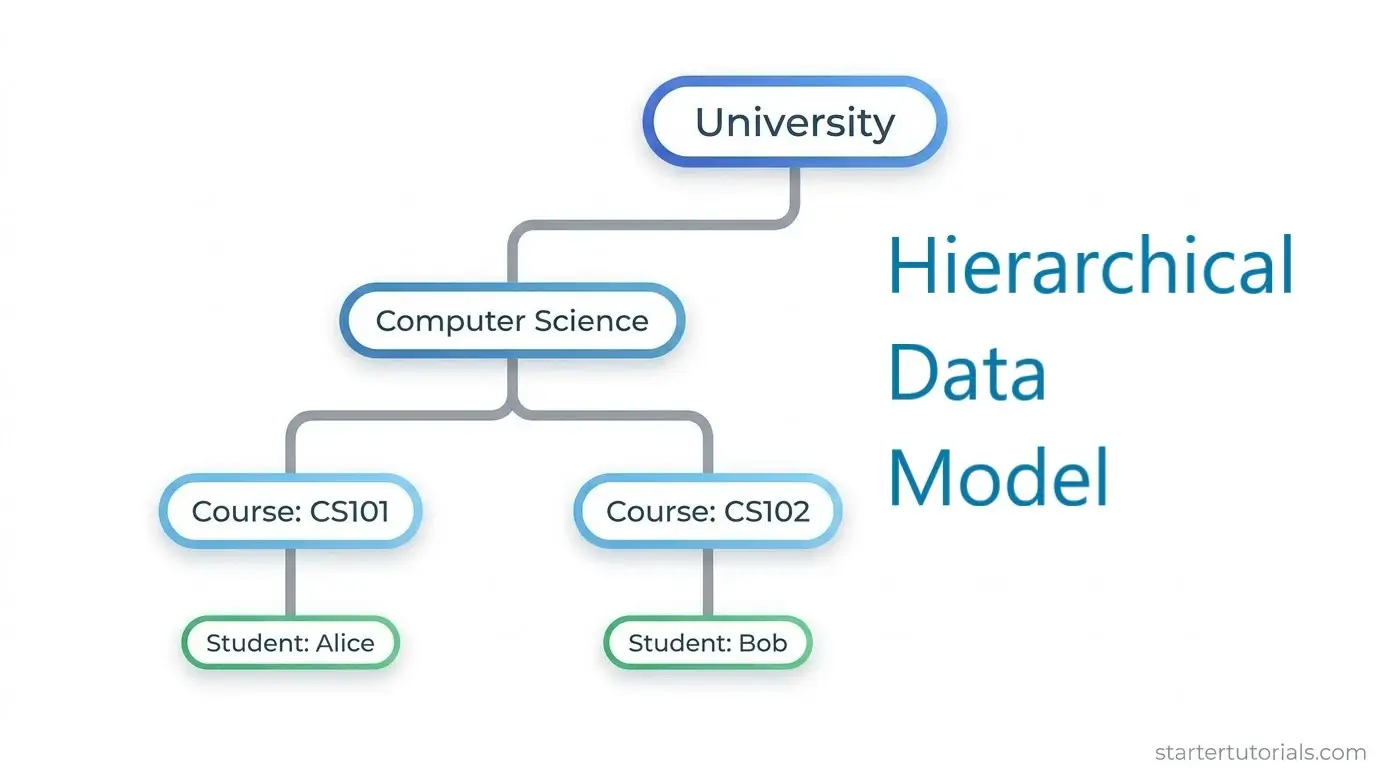
Representation using hierarchical data model
Data is organized in a strict top-down tree. A child node (e.g., a Course) can belong to only one parent (e.g., a Department).
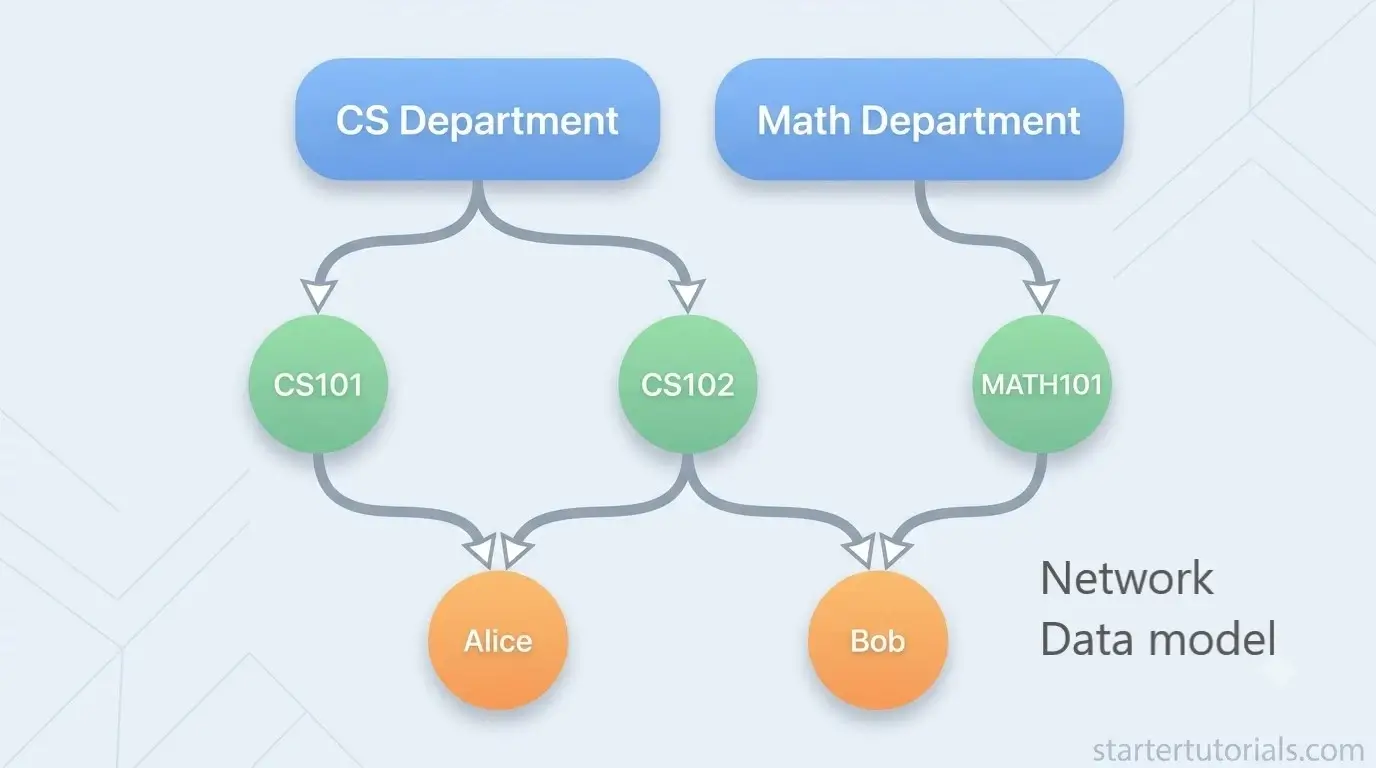
Representation using network data model
Solves the duplicate problem by allowing a child node to have multiple parents using direct links/pointers.
Representation using object-oriented data model
Combines data attributes with behavior/methods inside object classes.
// Class Definition in Java

class Student {

    String studentId = "S101";

    String name = "Alice";

    List<Course> enrolledCourses = [CS101_Object, MATH101_Object];


    // Embedded Method

    double calculateGPA() {

        // Method code to compute GPA dynamically

    }

}
Representation using object-relational data model
Uses standard SQL tables but allows custom data types, nested arrays, or methods directly in column definitions.
SQL snippets:
-- Custom composite data type

CREATE TYPE AddressType AS (

    street VARCHAR(50),

    city VARCHAR(30),

    zipcode VARCHAR(10)

);


-- Table combining relational columns with array and custom types

CREATE TABLE Students (

    Student_ID VARCHAR(10) PRIMARY KEY,

    Name VARCHAR(50),

    Home_Address AddressType,                     -- Nested Object Type

    Enrolled_Courses VARCHAR(10)[]                -- Array of Course IDs

);


INSERT INTO Students VALUES (

    'S101',

    'Alice',

    ROW('123 College Rd', 'Boston', '02115'),

    ARRAY['CS101', 'MATH101']

);

Mr. P.S.Suryateja, also known as Suryateja Pericherla, is at present a Research Scholar (full-time Ph.D.) in the Dept. of Computer Science & Systems Engineering at Andhra University, Visakhapatnam. Previously worked as an Associate Professor in the Dept. of CSE at Vishnu Institute of Technology, India.
He has 14+ years of teaching experience and is an individual researcher whose research interests are Cloud Computing, Internet of Things, Computer Security, Network Security and Blockchain.
He is a member of professional societies like IEEE, ACM, CSI and ISCA. He published several research papers which are indexed by SCIE, WoS, Scopus, Springer and others.
Leave a Reply