
Every modern digital application relies on stored information, and understanding the basics of database management starts with a proper introduction to SQL. SQL, or Structured Query Language, is the universal language designed for communicating with relational database management systems (RDBMS).
Whether you are exploring SQL fundamentals, learning database query basics, or getting an overview of SQL commands, mastering this language allows you to effortlessly store, retrieve, update, and manage structured data.
This comprehensive beginner’s guide to SQL covers everything you need to know from how queries execute under the hood and the primary types of database commands to the key benefits and practical limitations of using SQL in real-world applications.
What is SQL?
Structured Query Language (SQL) is the standard computer language used to communicate with and manage databases. Think of a database as a massive, highly organized digital filing cabinet, and SQL as the specialized language you use to ask for specific information from it.
With SQL, you can easily request data (like finding a customer’s order history), add new information (like registering a new user), update existing records, or delete outdated files. It acts as the bridge between software applications and the vast amounts of structured data they need to store and retrieve every day.
What SQL can do?
SQL acts as a complete control panel for managing stored information, allowing you to search, add, edit, and remove data with simple text commands. It lets you retrieve specific records, like searching for all customers who bought a product this month and sort or filter millions of items in seconds.
Beyond searching, SQL enables you to insert new files, update existing information when details change, and delete outdated data safely. It also provides tools to organize data into clean tables, set rules to keep information accurate, and manage security permissions so only authorized users can access sensitive records.
Importance of SQL
SQL is important because nearly every modern app, website, and business relies on data to operate, and SQL is the universal language used to handle it. Whether a bank is tracking account balances, an online store is processing sales, or a streaming app is recommending movies, SQL ensures that vast amounts of information remain organized, secure, and accessible in real time. Without SQL, fetching accurate data quickly would be extremely slow and complex, making it an essential tool for soft-ware development, business analytics, and data science.
How does a SQL query work?
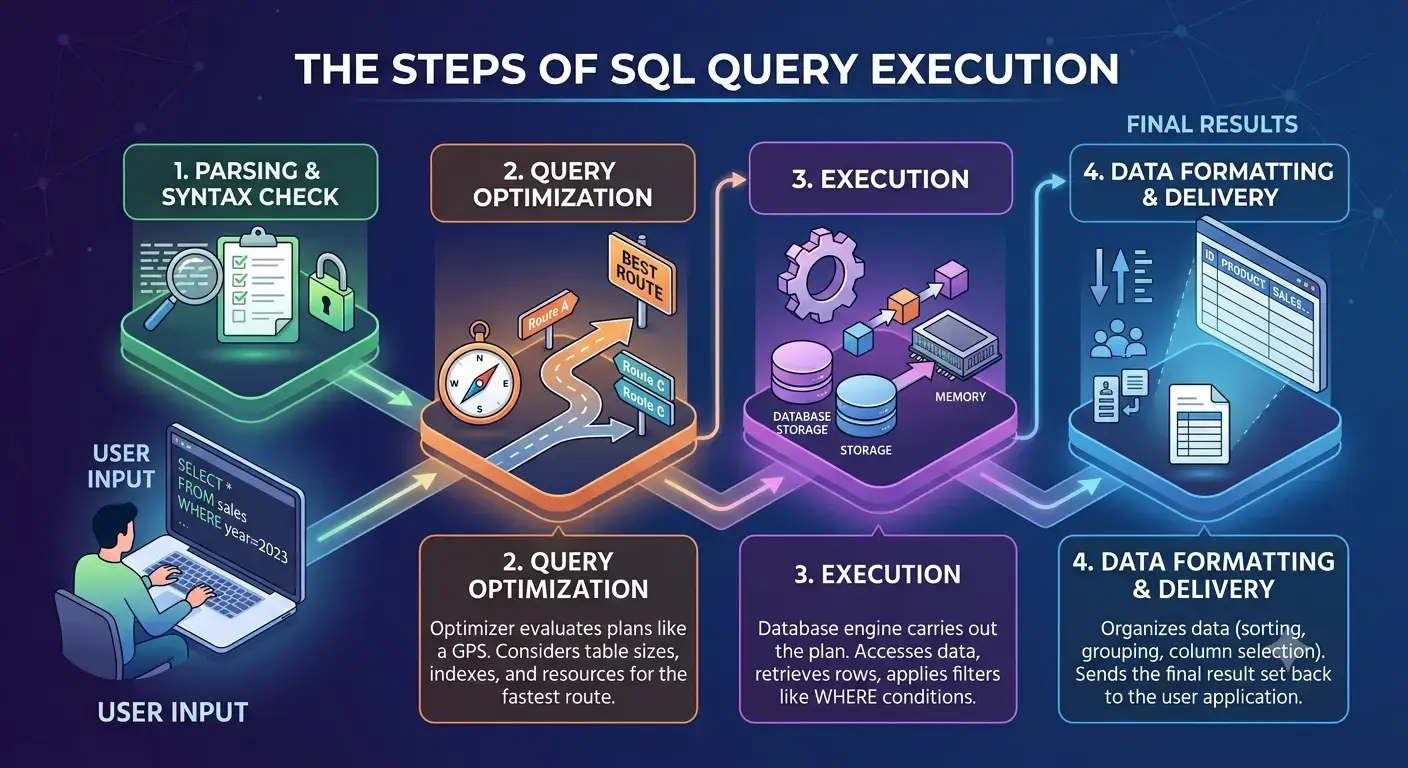
When a SQL query is given or executed by a user, it goes through several steps as laid out below:
- Parsing and Syntax Check: The database engine reads your written SQL command to make sure there are no typos or syntax errors. It verifies that the tables and column names you requested actually exist in the database and that your account has permission to access them.
- Query Optimization: The database’s query optimizer evaluates multiple ways to fetch your data. It looks at table sizes, existing indexes, and system resources to pick the fastest and most efficient plan; much like a GPS finding the fastest route before you start driving.
- Execution: The database engine carries out the plan generated by the optimizer. It accesses the physical storage, retrieves the relevant table rows, applies your filters (like WHERE conditions), and holds the intermediate data in memory.
- Data Formatting and Delivery: The database organizes the matching data according to your request, sorting rows, grouping values, or selecting only specific columns and sends the final result set back to your application or screen.
The SQL query evaluation steps can be illustrated as shown in the image below:
Types of SQL commands
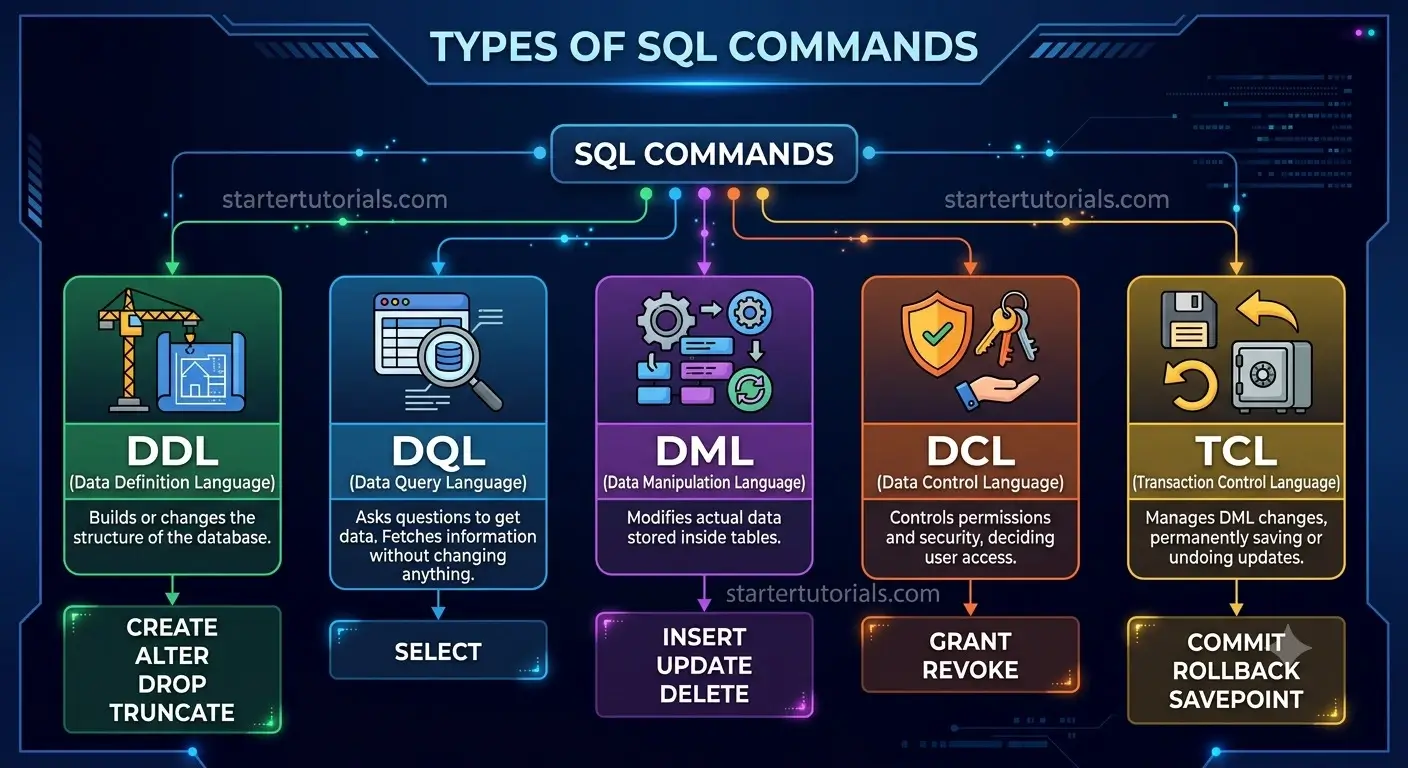
SQL commands are grouped into five main categories based on what they do to the database:
- DDL (Data Definition Language): Builds or changes the structure of the database. Think of it as creating or altering the physical tables and folders. (Commands: CREATE, ALTER, DROP, TRUNCATE)
- DQL (Data Query Language): Asks questions to get data out of the database. It is used strictly to fetch and view information without changing anything. (Command: SELECT)
- DML (Data Manipulation Language): Modifies the actual data stored inside the tables. (Commands: INSERT, UPDATE, DELETE)
- DCL (Data Control Language): Controls permissions and security, deciding who is allowed to view or edit the data. (Commands: GRANT, REVOKE)
- TCL (Transaction Control Language): Manages changes made by DML commands, allowing you to permanently save updates or undo mistakes before saving. (Commands: COMMIT, ROLLBACK, SAVEPOINT)
The types of SQL commands can be illustrate as shown in the image below:
Benefits of SQL
SQL offers several major advantages that make it the gold standard for managing data across technology systems:
- Easy to Learn and Read: SQL relies on common English words (like SELECT, FROM, WHERE, and INSERT), making it straightforward to write, understand, and debug compared to complex programming code.
- Blazing Fast Data Retrieval: SQL can search, filter, and retrieve specific answers from millions of data records in fractions of a second, saving huge amounts of manual processing time.
- Universal Standard: Almost all major database systems (like MySQL, PostgreSQL, Oracle, and SQL Server) use SQL, meaning the skills you learn in one system transfer directly to others.
- Handles Massive Amounts of Data: Whether you are managing thousands of user accounts or tracking billions of online store transactions, SQL scales effortlessly to handle massive datasets.
- High Accuracy and Security: SQL allows administrators to enforce strict rules so data remains accurate and consistent, while also controlling access so only authorized users can view or change sensitive information.
Limitations of SQL
While SQL is powerful, it has several key limitations that can make it challenging or unsuitable for certain types of projects:
- Rigid Structure: SQL requires data to fit into neat, pre-defined tables with rows and columns. It struggles with unstructured or rapidly changing data, such as social media posts, videos, or raw documents.
- Difficult Horizontal Scaling: Scaling a SQL database across multiple servers (horizontal scaling) is complex and expensive. Most SQL databases grow by adding more power to a single server, which hits physical hardware limits.
- High Cost of Infrastructure: As data grows massive, maintaining high-performance SQL databases can become very costly in terms of licensing, hardware, and dedicated database administrators.
- Complex Interface and Dialects: While basic SQL is easy to learn, advanced queries involving many joined tables become long, messy, and hard to maintain. Additionally, different database vendors (like MySQL vs. Oracle) use slightly different “dialects,” which can make switching systems difficult.
- Overhead for Simple Data: For simple applications that only store temporary settings or basic key-value pairs, setting up a full SQL relational database adds unnecessary setup time and performance overhead.

Mr. P.S.Suryateja, also known as Suryateja Pericherla, is at present a Research Scholar (full-time Ph.D.) in the Dept. of Computer Science & Systems Engineering at Andhra University, Visakhapatnam. Previously worked as an Associate Professor in the Dept. of CSE at Vishnu Institute of Technology, India.
He has 14+ years of teaching experience and is an individual researcher whose research interests are Cloud Computing, Internet of Things, Computer Security, Network Security and Blockchain.
He is a member of professional societies like IEEE, ACM, CSI and ISCA. He published several research papers which are indexed by SCIE, WoS, Scopus, Springer and others.
Leave a Reply