
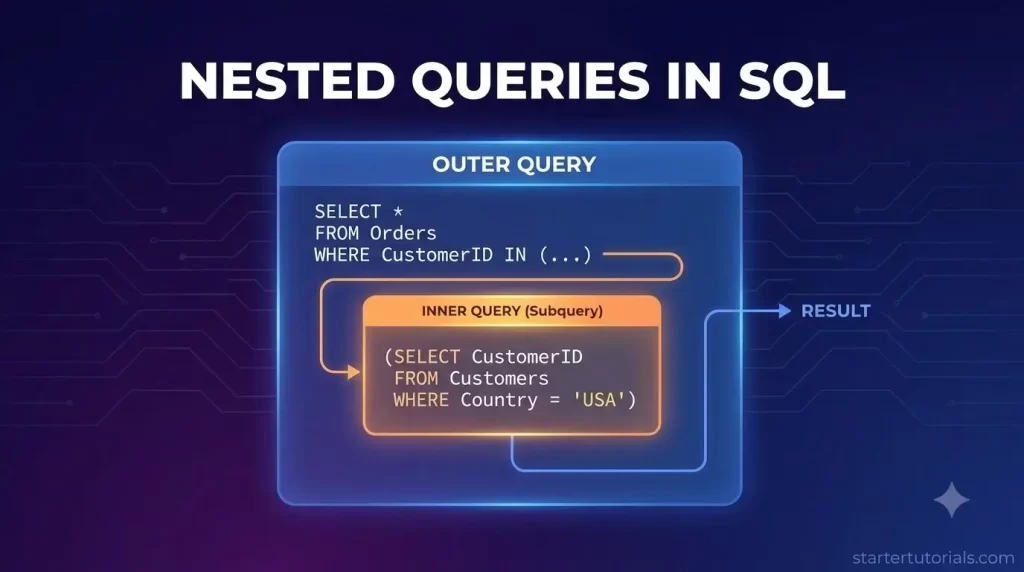
Mastering nested queries in SQL is one of the most effective ways to retrieve complex, multi-layered data using a single database command. Also commonly referred to as SQL subqueries, inner queries, or embedded queries, a nested query allows you to place one SELECT statement inside another to solve multi-step problems dynamically.
Whether you need to filter records based on an calculated average, test for data existence, or pass dynamic values between tables, understanding how to write and optimize nested subqueries in SQL will significantly upgrade your data querying capabilities.
What is a nested query or a sub query in SQL?
A nested query, also known as a subquery, is simply a query placed inside another SQL query to help retrieve complex or multi-layered data. Think of it like a set of Russian nesting dolls or a sentence with a detail in parentheses: the inner query runs first, finds a specific piece of information (such as the highest salary or a list of active user IDs), and hands that result directly to the outer query. The outer query then uses that newly calculated value to filter or complete its main task. By placing one query inside another, you can ask multi-step questions in a single command, such as “Find all employees whose salary is higher than the average company salary.”
When to use a nested query?
You should use a nested query when you need to answer a multi-step question where the answer to the first step isn’t known ahead of time. It is ideal for filtering data based on dynamic values, like finding customers who spent more than the average amount, since the inner query calculates that average first and passes it to the main query.
Nested queries are also useful for checking whether records exist in another dataset, filtering results against a list generated on the fly, or isolating complex calculations before performing a final action.
Whenever your database request depends on a value that must be calculated or looked up first, a nested query is the right tool for the job.
How to use a nested query?
To use a nested query, you enclose a complete SELECT statement inside parentheses and place it within the WHERE, HAVING, or FROM clause of your main query. When SQL executes your code, it runs the inner query in parentheses first to retrieve or calculate a specific value, such as an average, a max limit, or a list of matching IDs. Once the inner query gets that answer, it replaces the parentheses with its result, allowing the outer query to run and filter its data against that calculated value.
Syntax:
SELECT column1, column2

FROM table_name

WHERE column_name OPERATOR (

    SELECT column_name

    FROM table_name

    WHERE condition

);
Types of nested queries with examples
Nested queries in SQL are categorized based on how the inner query returns its data and how it interacts with the outer query. Below are the primary types explained using the University Database.
Single-Row Subquery
A single-row subquery returns exactly one row and one column (a single value) to the outer query. You use standard comparison operators like =, >, or < with it.
Example Query:
SELECT Student_ID, Student_Name

FROM Student

WHERE Dept_ID = (

    SELECT Dept_ID

    FROM Professor

    WHERE Prof_Name = 'Dr. Alice Smith'

);
Query Description: The inner query looks up the department ID for “Dr. Alice Smith” (Dept_ID = 101). The outer query then retrieves all students who belong to department 101.
Output:
| Student_ID | Student_Name |
| 1001 | John Doe |
| 1002 | Jane Smith |
Multi-Row Subquery
A multi-row subquery returns multiple rows but a single column. It uses operators like IN, ANY, or ALL to compare values.
Example Query:
SELECT Student_ID, Student_Name

FROM Student

WHERE Student_ID IN (

    SELECT Student_ID

    FROM Enrollment

    WHERE Course_ID IN (201, 202)

);
Query Description: The inner query searches the Enrollment table and returns a list of student IDs enrolled in courses 201 or 202 (which returns 1001 and 1002). The outer query selects the names of students matching those IDs.
Output:
| Student_ID | Student_Name |
| 1001 | John Doe |
| 1002 | Jane Smith |
Multi-Column Subquery
A multi-column subquery returns more than one column to the outer query. The outer query checks multiple columns at once to find a matching combination.
Example Query:
SELECT Student_ID, Course_ID, Prof_ID

FROM Project_Assignment

WHERE (Course_ID, Prof_ID) IN (

    SELECT Course_ID, Prof_ID

    FROM Course

    WHERE Course_Name = 'Database Systems'

);
Query Description: The inner query finds the Course_ID and Prof_ID for “Database Systems” (201, 1). The outer query retrieves all project assignments that match both the course and professor simultaneously.
Output:
| Student_ID | Course_ID | Prof_ID |
| 1001 | 201 | 1 |
| 1002 | 201 | 1 |
A correlated subquery depends on data from the outer query to execute. Unlike standard subqueries that run once, a correlated subquery runs repeatedly—once for every row processed by the outer query.
Example Query:
SELECT P.Prof_ID, P.Prof_Name

FROM Professor P

WHERE EXISTS (

    SELECT 1

    FROM Dependent D

    WHERE D.Prof_ID = P.Prof_ID AND D.Age < 10

);
Query Description: For each professor in the outer query, the inner query checks the Dependent table to see if that specific professor has a dependent under age 10. If a matching dependent exists (like Dr. Alice Smith’s dependents), the professor is included in the output.
Output:
| Prof_ID | Prof_Name |
| 1 | Dr. Alice Smith |
| 3 | Dr. Charlie Brown |
Nested Subquery (Subquery inside a Subquery)
A nested subquery occurs when an inner query contains another subquery inside itself to perform multi-level filtering.
Example Query:
SELECT Student_Name

FROM Student

WHERE Student_ID IN (

    SELECT Student_ID

    FROM Enrollment

    WHERE Course_ID = (

        SELECT Course_ID

        FROM Course

        WHERE Course_Name = 'Thermodynamics'

    )

);
Query Description: innermost query finds the Course_ID for “Thermodynamics” (204). The middle query finds all student IDs enrolled in course 204 (1004). The outer query retrieves the student name matching that ID.
Output:
| Student_Name |
| Emily Davis |
The key difference between an independent subquery and a correlated subquery comes down to whether the inner query can run on its own without needing information from the outer query.
- Independent Subquery (Uncorrelated): The inner query is completely self-contained and does not depend on the outer query. It runs just once before the outer query executes, produces a static result (like a single number or a list), and hands that result to the outer query. Because it executes once, independent subqueries are generally faster and more efficient on large datasets.
- Correlated Subquery: The inner query depends directly on data from the outer query to function (it references a column from the outer table). As a result, the inner query cannot run on its own; instead, it runs repeatedly, once for every single row evaluated by the outer query. Because it executes multiple times, correlated subqueries can be slower on large datasets, but they allow for row-by-row comparisons.
The differences between independent and correlated subqueries are summarized in the table below:
| Feature | Independent Subquery | Correlated Subquery |
|---|---|---|
| Dependency | Independent of the outer query | Depends on columns from the outer query |
| Execution | Runs once before the main query | Runs repeatedly (once per outer row) |
| Standalone Ability | Can be copied and run by itself | Cannot run alone without the outer query |
| Common Operators | IN, =, >, < | EXISTS, NOT EXISTS |
Differences between nested queries and join queries
The primary difference between a nested query (subquery) and a JOIN query lies in how they retrieve and process data across multiple tables. While both can combine information from different sources, they serve distinct purposes and perform operations differently:
- Nested Query: A query embedded inside another query that breaks down a complex task into sequential steps. The inner query evaluates first to calculate an intermediate result (such as an average or a specific list of IDs) and passes that single outcome to the outer query. Nested queries are easier to read for multi-stage questions, but they often compute results in isolation and can be slower if re-evaluated repeatedly (like in correlated subqueries).
- JOIN Query: A single operation that combines columns from two or more tables side-by-side based on a shared column (a common relationship, like a foreign key). SQL evaluates joins in parallel using optimized join algorithms, making them faster and far more efficient when retrieving multiple columns from different tables at the same time.
The differences between nested queries and join queries are summarized in the table given below:
| Feature | Nested Query (Subquery) | JOIN Query |
|---|---|---|
| Primary Purpose | To filter or evaluate data in intermediate steps. | To combine and display related columns side-by-side. |
| Output Capability | Can typically return columns from only the outer query. | Can easily return columns from all joined tables at once. |
| Performance | Can be slower, especially when using correlated subqueries. | Highly optimized by relational database engines for speed. |
| Readability | Read sequentially from the inside out; easier for step-by-step logic. | Read as a unified relational operation across tables. |

Mr. P.S.Suryateja, also known as Suryateja Pericherla, is at present a Research Scholar (full-time Ph.D.) in the Dept. of Computer Science & Systems Engineering at Andhra University, Visakhapatnam. Previously worked as an Associate Professor in the Dept. of CSE at Vishnu Institute of Technology, India.
He has 14+ years of teaching experience and is an individual researcher whose research interests are Cloud Computing, Internet of Things, Computer Security, Network Security and Blockchain.
He is a member of professional societies like IEEE, ACM, CSI and ISCA. He published several research papers which are indexed by SCIE, WoS, Scopus, Springer and others.
Leave a Reply