

Mastering the Select Command in SQL is the foundation of working with databases, as it serves as the primary tool for querying, retrieving, and viewing stored data. Whether you need to run a basic SQL SELECT query, extract specific fields using SELECT statements, or filter large datasets with the SELECT clause, understanding how to fetch data efficiently is essential for database management.
In this tutorial, we will explore what the SELECT command does, learn its complete syntax and order of execution, and walk through real-world examples to help you fetch and analyze data with confidence.
What is select command in SQL?
The SELECT command in SQL is used to read and fetch data from a database. Think of a database table like a large spreadsheet; the SELECT command allows you to choose exactly which columns and rows of information you want to look at. By specifying the fields you need and combining it with keywords like FROM (to name the specific table) and WHERE (to filter out specific records), you can retrieve precise answers from vast amounts of stored information without altering or damaging the original data.
What is the use of select command?
The main use of the SELECT command in SQL is to search for, retrieve, and view specific information stored in a database without changing any of the original records. Imagine a database as a massive digital filing cabinet, the SELECT command acts like a helpful assistant that opens the cabinet, picks out only the exact files or details you ask for (such as customer names or sales from a specific month), and presents them to you as a clean, custom table.
Complete syntax of select command
The complete syntax of the SELECT command follows a specific sequence of clauses that tell the database how to retrieve, filter, organize, and limit your data:
SELECT column1, column2

FROM table_name

WHERE condition

GROUP BY column1

HAVING group_condition

ORDER BY column1 ASC|DESC

LIMIT number;
- SELECT: Specifies the exact columns (fields) you want to view (use * to select all columns).
- FROM: Names the specific table where your desired data is stored.
- WHERE: Filters individual rows based on a specific condition (for example, finding customers where age > 18).
- GROUP BY: Combines rows that have matching values into summary rows, often used alongside functions like COUNT() or SUM().
- HAVING: Filters the summarized groups created by GROUP BY (unlike WHERE, which filters individual rows before grouping).
- ORDER BY: Sorts the resulting records in ascending (ASC) or descending (DESC) order based on one or more columns.
- LIMIT: Restricts the total number of rows returned in the final output (useful for displaying top results or managing large datasets).
Order of execution of the select command
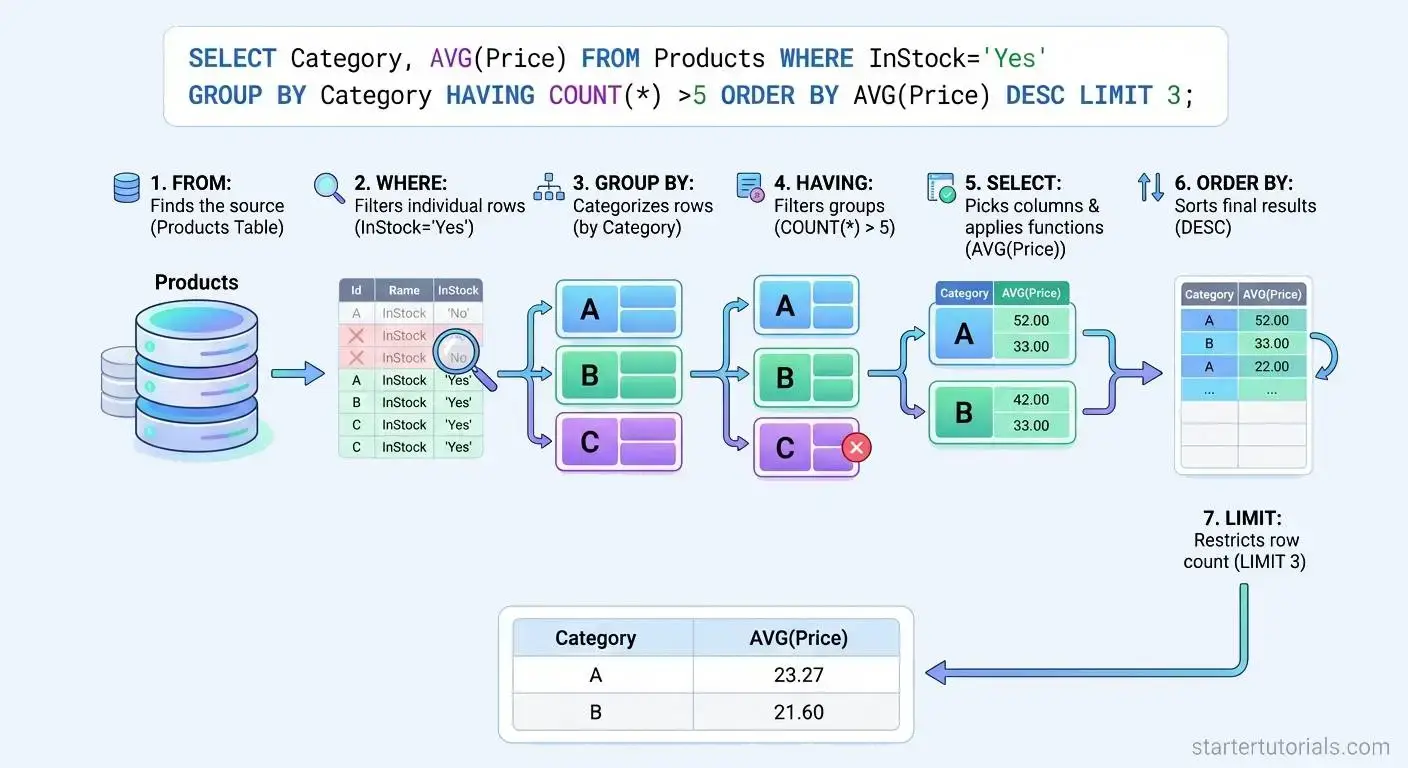
Even though you write an SQL query starting with SELECT, the database processes the clauses in a completely different order to efficiently gather and refine the data.
SELECT column1, column2      -- 5. Chooses columns

FROM table_name              -- 1. Locates the source data

WHERE condition              -- 2. Filters individual rows

GROUP BY column1             -- 3. Groups rows together

HAVING group_condition       -- 4. Filters grouped rows

ORDER BY column1 ASC|DESC    -- 6. Sorts the final output

LIMIT number;                -- 7. Restricts row count
The select command executes in this order:
- FROM: The database starts by locating the target table to identify the source dataset.
- WHERE: It filters out individual rows that do not meet your specified conditions before any calculations happen.
- GROUP BY: It organizes the remaining rows into summary categories based on matching values.
- HAVING: It filters those grouped categories using aggregate conditions (like keeping groups where COUNT(*) > 5).
- SELECT: It selects the specific columns or expressions you requested to construct the final dataset columns.
- ORDER BY: It sorts the selected result set in ascending or descending order.
- LIMIT: It trims the sorted results to display only the specified maximum number of rows.
The above order of execution of a select command is illustrated in the figure below with an example:
Examples of select command
Examples of various forms of the SELECT command, using the University database schema and tables along with the output for each query are given below:
Basic SELECT (All Columns)
Retrieves every column and row from the Department table.
Query:
SELECT *

FROM Department;
Output:
| Dept_ID | Dept_Name | Chair_Prof_ID |
| 101 | Computer Science | 1 |
| 102 | Electrical Engineering | 3 |
| 103 | Mechanical Engineering | 4 |
| 104 | Mathematics | 5 |
| 105 | Physics | 6 |
| 106 | Civil Engineering | NULL |
Selecting Specific Columns
Retrieves only the dependent name and age from the Dependent table.
Query:
SELECT Dep_Name, Age

FROM Dependent;
Output:
| Dep_Name | Age |
| Emma Smith | 10 |
| Liam Smith | 8 |
| Noah Jones | 12 |
| Olivia Brown | 5 |
| Ethan Prince | 15 |
| Alphonse Elric | 17 |
Filtering Data with WHERE
Retrieves professors who belong to Department ID 101 from the Professor table.
Query:
SELECT Prof_ID, Prof_Name

FROM Professor

WHERE Dept_ID = 101;
Output:
| Prof_ID | Prof_Name |
| 1 | Dr. Alice Smith |
| 2 | Dr. Bob Jones |
Sorting Data with ORDER BY
Retrieves dependents sorted by their Age in descending order from the Dependent table.
Query:
SELECT Dep_Name, Age

FROM Dependent

ORDER BY Age DESC;
Output:
| Dep_Name | Age |
| Alphonse Elric | 17 |
| Ethan Prince | 15 |
| Noah Jones | 12 |
| Emma Smith | 10 |
| Liam Smith | 8 |
| Olivia Brown | 5 |
Limiting Results with LIMIT
Retrieves the top 3 oldest dependents from the Dependent table.
Query:
SELECT Dep_Name, Age

FROM Dependent

ORDER BY Age DESC

LIMIT 3;
Output:
| Dep_Name | Age |
| Alphonse Elric | 17 |
| Ethan Prince | 15 |
| Noah Jones | 12 |
Aggregating Data (COUNT, AVG, MAX, MIN)
Calculates total number of dependents and their average age from the Dependent table.
Query:
SELECT COUNT(*) AS Total_Dependents, AVG(Age) AS Average_Age

FROM Dependent;
Output:
| Total_Dependents | Average_Age |
| 6 | 11.17 |
Grouping Data with GROUP BY
Counts the number of students enrolled in each department using the Student table.
Query:
SELECT Dept_ID, COUNT(Student_ID) AS Total_Students

FROM Student

GROUP BY Dept_ID;
Output:
| Dept_ID | Total_Students |
| 101 | 2 |
| 102 | 1 |
| 103 | 1 |
| 104 | 1 |
| 105 | 1 |
Filtering Grouped Data with HAVING
Finds departments from the Student table that have more than 1 student.
Query:
SELECT Dept_ID, COUNT(Student_ID) AS Total_Students

FROM Student

GROUP BY Dept_ID

HAVING COUNT(Student_ID) > 1;
Output:
| Dept_ID | Total_Students |
| 101 | 2 |
Joining Tables (INNER JOIN)
Combines Student and Department tables to display student names alongside their department names.
Query:
SELECT S.Student_Name, D.Dept_Name

FROM Student S

INNER JOIN Department D ON S.Dept_ID = D.Dept_ID;
Output:
| Student_Name | Dept_Name |
| John Doe | Computer Science |
| Jane Smith | Computer Science |
| Alex Johnson | Electrical Engineering |
| Emily Davis | Mechanical Engineering |
| Michael Wilson | Mathematics |
| Sarah Taylor | Physics |
Subquery (Nested SELECT)
Retrieves students enrolled in courses taught by Professor ID 1 by querying the Enrollment and Course tables.
Query:
SELECT Student_ID

FROM Enrollment

WHERE Course_ID IN (

    SELECT Course_ID

    FROM Course

    WHERE Prof_ID = 1

);
Output:
| Student_ID |
| 1001 |
| 1002 |
What are the differences between select in relational algebra and SQL?
While both Relational Algebra and SQL use the term SELECT, they operate differently in terms of syntax, purpose, duplicate handling, and output. The differences between them are given in the table below:
| Feature | Relational Algebra (σ) | SQL (SELECT) |
|---|---|---|
| Primary Purpose | Acts strictly as a selection operator to filter rows based on a condition. | Acts as a full query block that projects columns, joins, aggregates, filters, and sorts. |
| SQL Equivalent | Corresponds specifically to the WHERE clause. | Encompasses projection, selection, joining, grouping, and ordering. |
| Duplicate Handling | Operates on sets; automatically eliminates duplicates. | Operates on multisets (bags); retains duplicates by default unless DISTINCT is specified. |
| Nature | Procedural: Specifies how to construct the query result step-by-step. | Declarative: Specifies what data to retrieve, leaving execution steps to the query optimizer. |
| Column Selection | Does not choose columns. Projection (π) is required to filter columns. | Chooses columns directly in the SELECT list (e.g., SELECT col1, col2). |
| Syntax/Notation | Uses mathematical notation: σcondition(Relation) | Uses standard SQL syntax: SELECT ... FROM ... WHERE ... |

Mr. P.S.Suryateja, also known as Suryateja Pericherla, is at present a Research Scholar (full-time Ph.D.) in the Dept. of Computer Science & Systems Engineering at Andhra University, Visakhapatnam. Previously worked as an Associate Professor in the Dept. of CSE at Vishnu Institute of Technology, India.
He has 14+ years of teaching experience and is an individual researcher whose research interests are Cloud Computing, Internet of Things, Computer Security, Network Security and Blockchain.
He is a member of professional societies like IEEE, ACM, CSI and ISCA. He published several research papers which are indexed by SCIE, WoS, Scopus, Springer and others.
Leave a Reply