
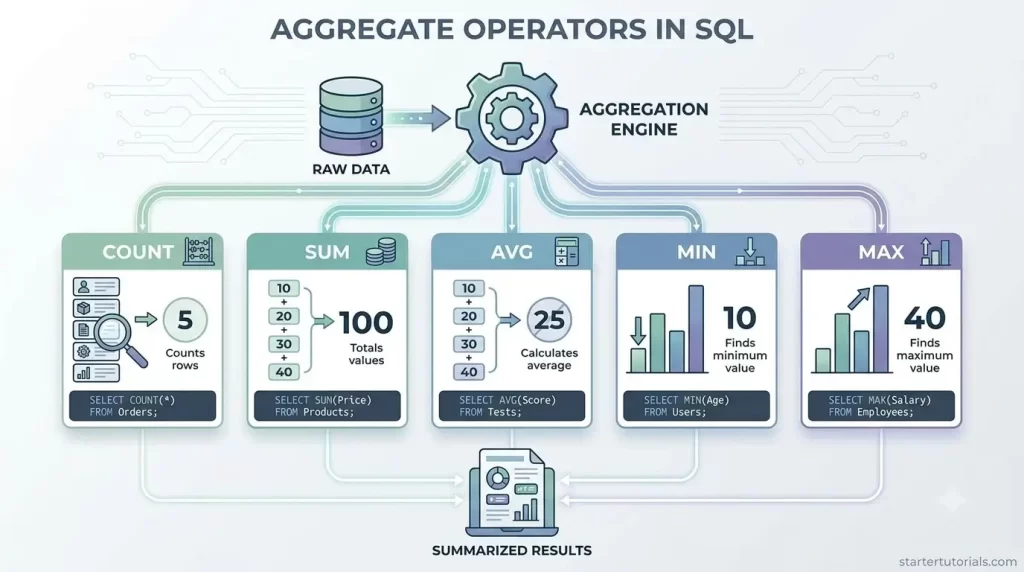
Aggregate operators in SQL are foundational tools for database management and data analysis. Whether you are running quick summary queries or building complex analytical reports, understanding how SQL aggregate functions work is essential for calculating totals, averages, ranges, and record counts across large datasets efficiently.
What are aggregate operators in SQL?
In SQL, aggregate operators (also called aggregate functions) are special built-in tools used to combine multiple rows of data from a table into a single summary value. Instead of returning details for every individual row, these operators look at an entire column or a grouped set of rows and calculate a quick statistical overview.
The most common aggregate operators are COUNT (to count how many items exist), SUM (to add numbers together), AVG (to find the average value), and MAX or MIN (to find the highest or lowest value). They are widely used alongside the GROUP BY clause when you need high-level answers, such as calculating total monthly sales, finding the average salary of a department, or counting how many customers registered today.
What is the use of aggregate operators?
The main use of aggregate operators in SQL is to summarize large amounts of detailed data into a single, meaningful answer so you can quickly analyze trends and make informed decisions. Instead of scrolling through thousands of individual rows like every single store transaction or user account these operators allow you to run instant calculations across an entire column to get big-picture insights.
List of aggregate operators
The five aggregate operators (or aggregate functions) in SQL are:
- Count
- Sum
- Avg
- Max
- Min
Let’s understand about each aggregate function in detail.
Count() function
Description: Counts the number of rows or non-null values in a column.
Syntax:
SELECT COUNT(column_name) FROM table_name;

-- Or to count all rows:

SELECT COUNT(*) FROM table_name;
Sum() function
Description: Adds up all the numeric values in a specified column to give a total.
Syntax:
SELECT SUM(column_name) FROM table_name;
Avg() function
Description: Calculates the average (mean) value of a numeric column by dividing the sum of values by the count.
Syntax:
SELECT AVG(column_name) FROM table_name;
Max() function
Description: Finds and returns the largest (highest) value in a column. Works with numbers, text (alphabetical last), and dates.
Syntax:
SELECT MAX(column_name) FROM table_name;
Min() function
Description: Finds and returns the smallest (lowest) value in a column. Works with numbers, text (alphabetical first), and dates.
Syntax:
SELECT MIN(column_name) FROM table_name;
Examples for aggregate operators
Let’s look at an example for each of the five SQL aggregate operators using our university database schema and tables.
Count() example
SQL Query:
SELECT COUNT(*) AS Total_Students

FROM Student;
This query looks at the Student table and counts the total number of records present. Since there are 6 distinct student rows (IDs 1001 through 1006) in the table, it returns a single total count of 6.
Output:
| Total_Students |
| 6 |
Sum() example
SQL Query:
SELECT SUM(Age) AS Total_Dependent_Age

FROM Dependent;
This query scans the Age column in the Dependent table and calculates the mathematical sum of all dependent ages. It adds up 10 + 8 + 12 + 5 + 15 + 17 to produce a total of 67.
Output:
| Total_Dependent_Age |
| 67 |
Avg() example
SQL Query:
SELECT AVG(Age) AS Average_Dependent_Age

FROM Dependent;
This query computes the average age of all records in the Dependent table. It sums all the ages (67) and divides the value by the total count of dependents (6), resulting in approximately 11.17.
Output:
| Average_Dependent_Age |
| 11.17 |
Max() example
SQL Query:
SELECT MAX(Age) AS Oldest_Dependent_Age

FROM Dependent;
This query searches through the Age column in the Dependent table to identify and return the highest value. Among all the dependent ages, 17 (belonging to Alphonse Elric) is the maximum value.
Output:
| Oldest_Dependent_Age |
| 17 |
Min() example
SQL Query:
SELECT MIN(Age) AS Youngest_Dependent_Age

FROM Dependent;
This query searches through the Age column in the Dependent table to find and return the smallest value. Among the ages listed (10, 8, 12, 5, 15, 17), the minimum value is 5 (belonging to Olivia Brown).
Output:
| Youngest_Dependent_Age |
| 5 |

Mr. P.S.Suryateja, also known as Suryateja Pericherla, is at present a Research Scholar (full-time Ph.D.) in the Dept. of Computer Science & Systems Engineering at Andhra University, Visakhapatnam. Previously worked as an Associate Professor in the Dept. of CSE at Vishnu Institute of Technology, India.
He has 14+ years of teaching experience and is an individual researcher whose research interests are Cloud Computing, Internet of Things, Computer Security, Network Security and Blockchain.
He is a member of professional societies like IEEE, ACM, CSI and ISCA. He published several research papers which are indexed by SCIE, WoS, Scopus, Springer and others.
Leave a Reply