
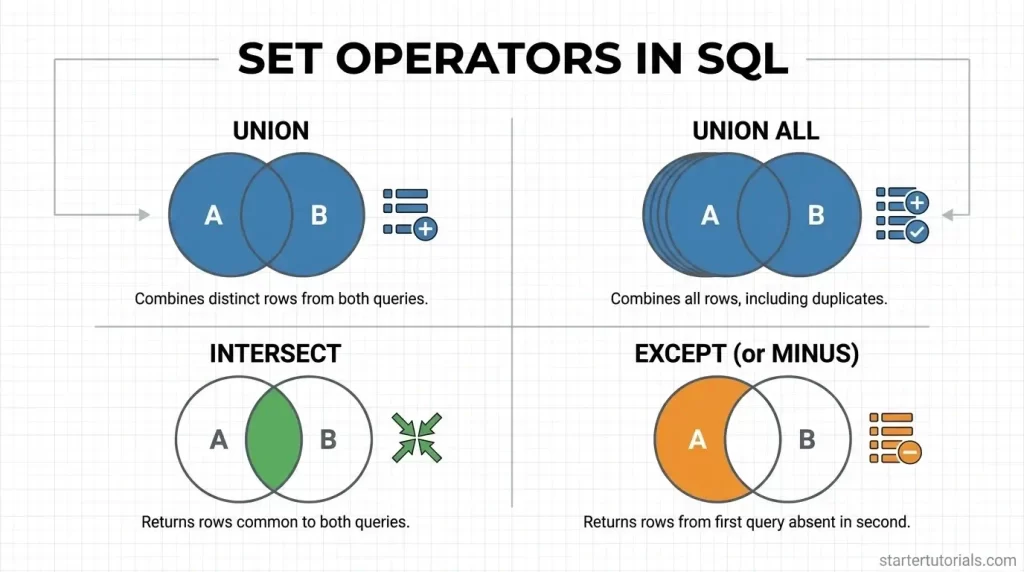
Set operators in SQL let you combine, compare, and filter records from multiple queries into a single, structured view. Whether you need to stack unique rows, merge entire datasets including duplicates, or isolate overlapping and differing records across tables, SQL set operators make managing multi-table data straightforward. By treating query results like mathematical sets, these commands simplify complex data combinations without requiring cumbersome joins or conditional logic.
What are set operators in SQL?
Set operators in SQL allow you to combine results from two or more SELECT queries into a single output. They work like Venn diagrams in math, treating the data returned by each query as a set of items.
The most common operators are UNION (which stacks all unique rows from both queries together), UNION ALL (which combines everything including duplicate rows), INTERSECT (which keeps only the matching rows that appear in both queries), and EXCEPT or MINUS (which takes the results from the first query and subtracts any rows found in the second query).
For these operators to work, both queries must select the same number of columns with matching data types in the same order.
What is the use of set operators?
Set operators are used to merge or compare data from multiple sources into a single, cohesive view without writing complex or repetitive code. They make it easy to perform common data tasks like:
- building master lists from separate tables (using UNION to bring together customer records from different regions)
- isolating shared data (using INTERSECT to find customers who bought both product A and product B)
- identifying gaps and differences (using EXCEPT to spot active users who haven’t made a purchase yet).
Ultimately, set operators save time and streamline your queries whenever you need to slice, combine, or contrast datasets that share a similar layout.
Set operators with examples
Set operators combine the results of two or more SELECT queries into a single result set. For set operators to work, both queries must select/have the same number of columns with compatible data types in the same order.
Here is a breakdown of each set operator using our university database schema and table data.
Union command
Combines the result sets of two queries and automatically removes any duplicate rows from the final output.
SELECT Dept_ID FROM Professor

UNION

SELECT Dept_ID FROM Student;
This query collects all department IDs assigned to professors and all department IDs assigned to students. It then merges them into a single list and strips out duplicate values, giving you a list of department IDs (101 through 105) that currently have either a professor or a student in them.
Output:
| Dept_ID |
| 101 |
| 102 |
| 103 |
| 104 |
| 105 |
Union All command
Combines the result sets of two queries while retaining all rows, including duplicates.
SELECT Dept_ID FROM Professor

UNION ALL

SELECT Dept_ID FROM Student;
This query performs the same collection as the UNION query by fetching the department IDs from both the Professor and Student tables. However, UNION ALL keeps all duplicate entries, resulting in a 12-row output representing all 6 professors and all 6 students.
Output:
| Dept_ID |
| 101 |
| 101 |
| 102 |
| 103 |
| 104 |
| 105 |
| 101 |
| 101 |
| 102 |
| 103 |
| 104 |
| 105 |
Intersect command
Returns only the unique rows that are present in both query results.
SELECT Dept_ID FROM Department

INTERSECT

SELECT Dept_ID FROM Professor;
This query checks the Department table for all existing department IDs and compares them against the department IDs present in the Professor table. It returns only the department IDs that exist in both tables (101 through 105), showing which departments currently have assigned professors.
Output:
| Dept_ID |
| 101 |
| 102 |
| 103 |
| 104 |
| 105 |
Except command
Returns the distinct rows from the first query that are not present in the second query.
SELECT Dept_ID FROM Department

EXCEPT

SELECT Dept_ID FROM Professor;
This query takes all department IDs from the Department table and subtracts any department IDs that are found in the Professor table. It isolates department ID 106 (Civil Engineering), revealing departments that currently do not have any professors assigned to them.
Output:
| Dept_ID |
| 106 |
Differences between union in Relational Algebra and SQL
The key differences between the UNION operation in theoretical Relational Algebra and practical SQL are given in the table below:
| Feature / Aspect | Relational Algebra (∪) | SQL (UNION / UNION ALL) |
|---|---|---|
| Data Structure Model | Operates strictly on Sets (mathematical collections without duplicate tuples). | Operates on Multisets / Bags ( collections that allow duplicate rows). |
| Handling Duplicates | Automatically eliminates duplicates by default as part of the core set definition. | Offers two variants: UNION (removes duplicates) and UNION ALL (retains duplicates). |
| Attribute / Column Naming | Input relations must be union-compatible, and attribute names in the output schema are predefined mathematically. | Column names in the result set are inherited directly from the first SELECT query in the operator sequence. |
| Execution Performance | A theoretical/formal mathematical construct; performance and sorting costs do not apply. | UNION requires extra processing overhead to sort and eliminate duplicate rows, while UNION ALL executes faster because no deduplication occurs. |
| Ordering Control | Has no concept or capability for ordering output tuples. | Allows explicit result sorting across the combined output using an ORDER BY clause at the end of the query. |

Mr. P.S.Suryateja, also known as Suryateja Pericherla, is at present a Research Scholar (full-time Ph.D.) in the Dept. of Computer Science & Systems Engineering at Andhra University, Visakhapatnam. Previously worked as an Associate Professor in the Dept. of CSE at Vishnu Institute of Technology, India.
He has 14+ years of teaching experience and is an individual researcher whose research interests are Cloud Computing, Internet of Things, Computer Security, Network Security and Blockchain.
He is a member of professional societies like IEEE, ACM, CSI and ISCA. He published several research papers which are indexed by SCIE, WoS, Scopus, Springer and others.
Leave a Reply