
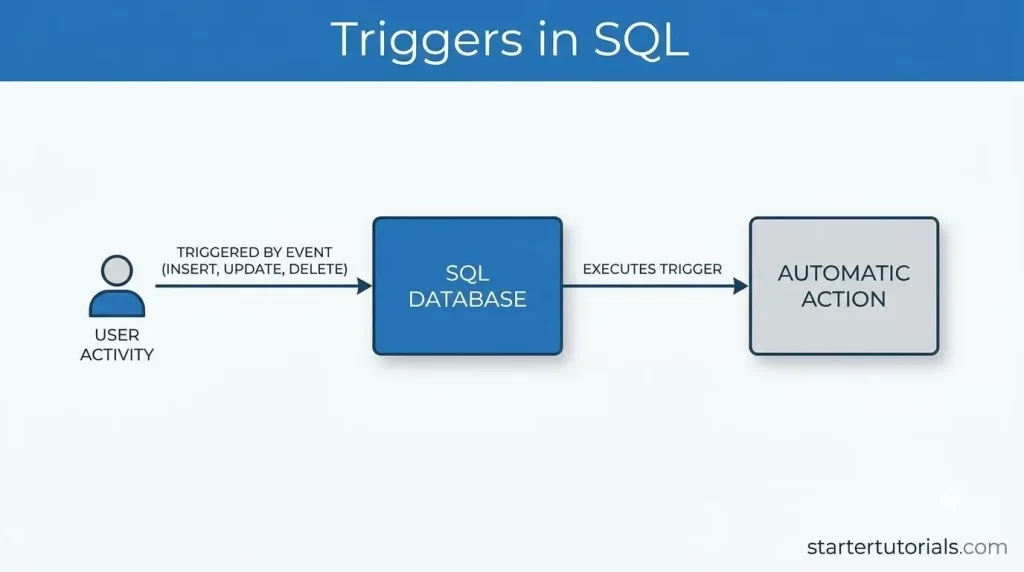
Triggers in SQL are automated database objects that executes specific code automatically whenever a designated event occurs on a table or database. Understanding SQL triggers, also referred to as database triggers, event triggers, or table triggers is essential for automating data validation, enforcing integrity rules, and maintaining audit logs.
By leveraging these automated SQL actions, developers can streamline database management and guarantee that critical background tasks execute consistently without requiring manual intervention from applications or users.
What is a trigger in SQL?
A trigger in SQL is like an automated security alarm or action rule for your database. It is a set of instructions that automatically fires or “triggers” whenever a specific action happens to a table, such as adding, updating, or deleting a row of data.
Instead of requiring a person or an app to remember to run extra commands manually, the database handles it behind the scenes; for example, you can set a trigger to automatically log every deleted customer record into a backup table, update product inventory numbers as soon as an order is placed, or prevent invalid data from being saved in the first place.
Use of triggers
The primary use of triggers in SQL is to automate repetitive database safety and management tasks so you never have to remember to do them manually. They are commonly used to maintain data integrity by enforcing strict rules that stop invalid data from entering the database, create detailed audit logs by automatically recording who changed or deleted sensitive information, and keep data synchronized across multiple tables, such as, automatically reducing item stock levels in an inventory table the moment a customer places an order. By handling these critical background actions right at the database level, triggers ensure your system stays accurate, secure, and consistent regardless of which app or user is adding data.
Trigger syntax in SQL
The basic syntax for creating a trigger in SQL follows a simple, fill-in-the-blank pattern where you specify when it runs, what action activates it, and what code executes.
Syntax of a trigger:
CREATE TRIGGER trigger_name

[BEFORE | AFTER | INSTEAD OF] [INSERT | UPDATE | DELETE]

ON table_name

FOR EACH ROW

BEGIN

    -- The SQL statements to execute automatically

END;
- CREATE TRIGGER trigger_name: Gives your automated rule a unique name so the database can reference it.
- BEFORE | AFTER | INSTEAD OF: Tells SQL when to run the rule either right before the change happens (great for checking errors), after the change completes (great for logging), or in place of the action.
- INSERT | UPDATE | DELETE: Specifies which event sets off the trigger.
- ON table_name: Identifies the specific table the trigger watches over.
- FOR EACH ROW: Ensures the code runs individually for every single row of data affected by the change.
- BEGIN … END: Wraps the actual SQL commands that execute automatically when activated (often using temporary keyword tables like NEW to inspect incoming data or OLD to check previous data).
Types of triggers with examples
SQL triggers can be categorized based on when they execute relative to a data modification event (INSERT, UPDATE, or DELETE).
All of the SQL examples uses our university database schema and tables.
BEFORE Trigger
Description: Executes before the database operation is saved. It is used for validating or modifying incoming data prior to insertion or updates.
Example SQL:
CREATE TRIGGER check_dependent_age

BEFORE INSERT ON Dependent

FOR EACH ROW

BEGIN

    IF NEW.Age < 0 THEN

        SET NEW.Age = 0;

    END IF;

END;
This trigger intercepts the data before it is saved to the database to inspect and modify it. In the check_dependent_age example, when someone tries to insert a negative age (-2), the trigger catches it prior to saving and changes it to 0
Action:
INSERT INTO Dependent (Prof_ID, Dep_Name, Age) VALUES (6, 'Nina Gallagher', -2);
Output (Dependent):
| Prof_ID | Dep_Name | Age |
| 1 | Emma Smith | 10 |
| 1 | Liam Smith | 8 |
| 2 | Noah Jones | 12 |
| 3 | Olivia Brown | 5 |
| 4 | Ethan Prince | 15 |
| 5 | Alphonse Elric | 17 |
| 6 | Nina Gallagher | 0 (Corrected by trigger) |
AFTER Trigger
Description: Executes after the database operation completes successfully. It is ideal for logging changes, updating linked tables, or maintaining relational consistency across tables.
Example SQL:
CREATE TRIGGER auto_assign_project

AFTER INSERT ON Enrollment

FOR EACH ROW

BEGIN

    INSERT INTO Project_Assignment (Student_ID, Course_ID, Prof_ID)

    SELECT NEW.Student_ID, NEW.Course_ID, C.Prof_ID

    FROM Course C WHERE C.Course_ID = NEW.Course_ID;

END;
This trigger reacts after a successful operation to handle follow-up tasks. In the auto_assign_project example, as soon as a student enrolls in a course, the trigger looks up which professor teaches that course and automatically creates a matching entry in the Project_Assignment table.
Action:
INSERT INTO Enrollment (Student_ID, Course_ID) VALUES (1006, 206);
Output (Project_Assignment):
| Student_ID | Course_ID | Prof_ID |
| 1001 | 201 | 1 |
| 1001 | 202 | 2 |
| 1002 | 201 | 1 |
| 1003 | 203 | 3 |
| 1004 | 204 | 4 |
| 1005 | 205 | 5 |
| 1006 | 206 | 6 (Auto-added by trigger) |
INSTEAD OF Trigger
Description: Intercepts the original SQL operation and executes custom logic in place of it. It is commonly used on SQL views to enable modifications on underlying base tables.
Example SQL:
-- View combining Student and Department data

CREATE VIEW Student_Dept_View AS

SELECT S.Student_ID, S.Student_Name, S.Dept_ID, D.Dept_Name

FROM Student S JOIN Department D ON S.Dept_ID = D.Dept_ID;


CREATE TRIGGER insert_via_view

INSTEAD OF INSERT ON Student_Dept_View

FOR EACH ROW

BEGIN

    INSERT INTO Student (Student_ID, Student_Name, Dept_ID)

    VALUES (NEW.Student_ID, NEW.Student_Name, NEW.Dept_ID);

END;
Bypasses the original user action entirely and runs its own custom logic instead. Views often cannot receive direct data insertions; this trigger catches an attempted insert on Student_Dept_View and reroutes the data into the actual Student base table.
Action:
INSERT INTO Student_Dept_View (Student_ID, Student_Name, Dept_ID, Dept_Name) VALUES (1007, 'Mark Taylor', 106, 'Civil Engineering');
Output (Student):
| Student_ID | Student_Name | Dept_ID |
| 1001 | John Doe | 101 |
| 1002 | Jane Smith | 101 |
| 1003 | Alex Johnson | 102 |
| 1004 | Emily Davis | 103 |
| 1005 | Michael Wilson | 104 |
| 1006 | Sarah Taylor | 105 |
| 1007 | Mark Taylor | 106 (Inserted into base table) |
In addition to timing-based triggers (BEFORE, AFTER, INSTEAD OF), SQL triggers are also categorized by their event type (what kind of operation fires them) and their granularity level (how often the trigger executes).
Statement-Level vs. Row-Level Triggers (Granularity)
These define how many times the trigger body runs when an SQL command affects multiple rows.
- Row-Level Trigger (FOR EACH ROW): Executes once for every single row modified by an SQL statement.
- Statement-Level Trigger (FOR EACH STATEMENT): Executes only once per SQL command, regardless of how many rows are updated, inserted, or deleted.
Statement-Level Trigger
Fires a single time when an SQL operation runs. Useful for logging or enforcing bulk system rules rather than checking individual row data.
Example SQL:
CREATE TRIGGER log_bulk_dept_update

AFTER UPDATE ON Student

FOR EACH STATEMENT

BEGIN

            INSERT INTO Audit_Log VALUES('Updated Students');

END;
This trigger monitors bulk SQL operations and runs its action only once per command, regardless of how many rows are changed. When updating multiple student records at once, it logs a single audit entry rather than spamming the log for every individual row.
Action:
UPDATE Student SET Dept_ID = 101 WHERE Dept_ID = 102;
Output:
Executes the logging code exactly 1 time after the statement finishes, even if 100 students were updated at once.
DDL Triggers
DDL triggers execute in response to schema modification commands rather than row-level data changes (such as CREATE, ALTER, or DROP). Used to prevent unauthorized schema changes or audit database admin actions.
Example SQL:
CREATE TRIGGER prevent_table_drop

BEFORE DROP ON DATABASE

BEGIN

            RAISE_APPLICATION_ERROR(-20001, 'Table deletion is strictly restricted.');

END;
Protects database architecture by listening for structural commands (CREATE, ALTER, DROP). When a user runs DROP TABLE Course;, the trigger intercepts the command, throws an error, and stops the table from being deleted.
Action:
DROP TABLE Course;
Output:
The drop operation is blocked, an error is thrown, and the Course table remains untouched in the database.
Logon / Database Event Triggers
These are system-level triggers that fire in response to administrative or connection events rather than standard data manipulation.
Example SQL:
CREATE TRIGGER track_user_login

AFTER LOGON ON DATABASE

BEGIN

            INSERT INTO User_Sessions VALUES(USER, CURRENT_TIMESTAMP);

END;
The moment a user logs into the university server, this trigger records their username and connection time into a security table for session tracking.
Action:
A professor or admin logs into the university database server.
Output:
A new record with the user’s username and login timestamp is added to the session log table without altering any academic tables.
Differences between a trigger and a stored procedure
The key difference between a trigger and a stored procedure comes down to how they run: a trigger executes automatically when a database event occurs, while a stored procedure must be called manually by a user or an application.
The differences between a trigger and a stored procedure are as shown in the table below:
| Feature | SQL Trigger | Stored Procedure |
|---|---|---|
| Execution | Automatic. Runs in response to database events (like INSERT, UPDATE, DELETE, or schema changes). | Manual. Must be explicitly called using a command like EXECUTE or CALL. |
| Control | Cannot be invoked directly by users or application code. | Directly invoked whenever a user or application program needs it. |
| Parameters | Cannot accept input or output parameters. | Accepts input (IN), output (OUT), and combined (INOUT) parameters. |
| Transaction Control | Shares the transaction of the SQL statement that fired it. You cannot directly commit or rollback transactions inside a trigger (in most database engines). | Allows full transaction control (COMMIT, ROLLBACK) inside the procedure logic. |
| Return Values | Cannot return values, data tables, or result sets. | Can return values, status codes, or entire table result sets. |
| Primary Purpose | Used for automated security, audit logging, data validation, and enforcing integrity rules across tables. | Used for reusable business logic, complex data processing tasks, and batch operations. |

Mr. P.S.Suryateja, also known as Suryateja Pericherla, is at present a Research Scholar (full-time Ph.D.) in the Dept. of Computer Science & Systems Engineering at Andhra University, Visakhapatnam. Previously worked as an Associate Professor in the Dept. of CSE at Vishnu Institute of Technology, India.
He has 14+ years of teaching experience and is an individual researcher whose research interests are Cloud Computing, Internet of Things, Computer Security, Network Security and Blockchain.
He is a member of professional societies like IEEE, ACM, CSI and ISCA. He published several research papers which are indexed by SCIE, WoS, Scopus, Springer and others.
Leave a Reply