
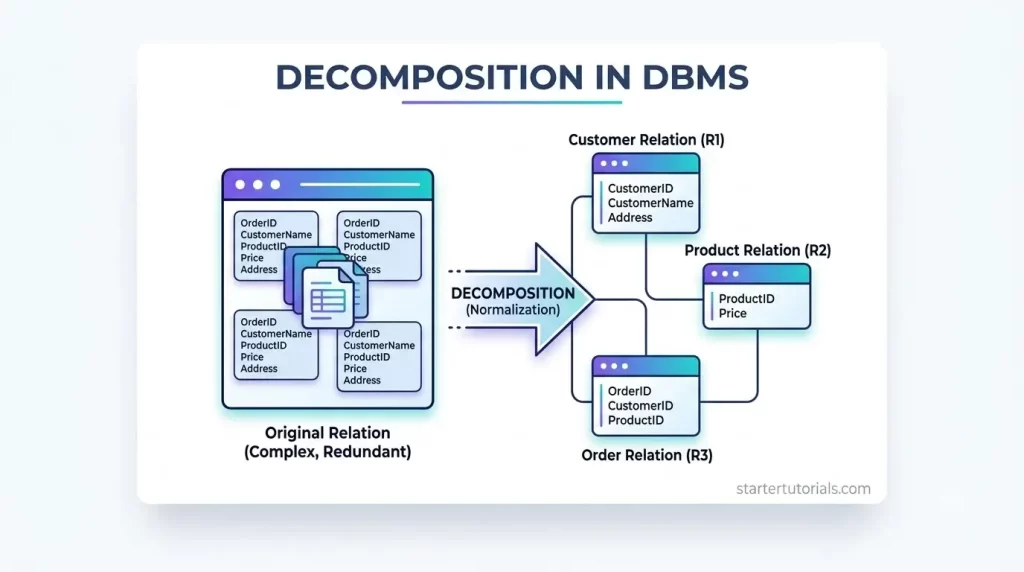
In database design, decomposition in DBMS is the essential process of splitting a bloated, messy table into smaller, well-structured ones to keep your data organized and error-free. When a single table attempts to store every detail about your application, it leads to massive redundancy, wasted storage, and severe update or deletion errors.
Applying table decomposition allows developers and database administrators to normalize their relational schemas, eliminating data anomalies while ensuring that all original information can be safely recombined.
Whether you refer to it as database table splitting, schema decomposition, or relational database decomposition, mastering this concept is the key to building scalable, clean, and highly efficient databases.
What is decomposition?
Decomposition in DBMS is the process of breaking down a large, bloated database table into smaller, more manageable tables to eliminate data redundancy and anomalies. When too much information is packed into a single table, updating or deleting an entry can accidentally cause duplicate data, lost details, or inconsistencies across the system.
By splitting the main table based on distinct relationships, such as separating student information from course enrollment details, decomposition keeps the database organized and clean while ensuring all original data can still be recombined without losing any information.
Need to perform decomposition?
We need to perform decomposition to prevent database errors and clean up messy, redundant information. When a database stores everything in one huge table, the same piece of information, like an author’s contact details or a customer’s address, gets typed out over and over again. This repetition wastes storage space and creates dangerous risks.
Updating an address in one row might leave old data in another (an update anomaly), adding a new product might force you to enter fake customer details (an insertion anomaly), and deleting an order might accidentally erase a customer’s entire profile (a deletion anomaly). Decomposing the table splits these mixed-up details into focused, dedicated tables, ensuring every piece of data lives in one place where it can be updated easily and safely.
Normalization and decomposition
The relationship between normalization and decomposition is like a goal and the tool used to achieve it: normalization is the process of organizing a database to eliminate duplicate data and prevent errors, while decomposition is the technique used to get there. To reach higher normal forms (like 2NF, 3NF, or BCNF) and fix a messy database, we must apply decomposition by breaking problematic, bloated tables into smaller, well-structured ones. Simply put, normalization tells you what needs to be fixed to keep your data clean, and decomposition is how you actually split the tables to fix it.
Properties of decomposition
When we split a large table into smaller ones, the split must be done carefully so you don’t lose information or corrupt database rules. To ensure a split is done correctly, a DBMS decomposition must satisfy two fundamental properties:
1. Lossless Join Property (No Lost or Fake Data)
This property guarantees that when we recombine (join) the smaller tables back together, you get the exact original table with no missing rows and no extra ghost rows (spurious tuples) added.
- Why it matters: If the decomposition is “lossy,” joining the tables later creates fake combinations of data that were never true in reality.
- The simple rule: For a split to be lossless, the smaller tables must share at least one common column, and that common column must be a primary key (unique identifier) in at least one of the smaller tables.
2. Dependency Preservation (No Lost Business Rules)
Every database has built-in rules called functional dependencies (e.g., “Student ID determines Student Name” or “Zip Code determines City”). Dependency preservation ensures that all original data rules still exist within individual smaller tables after the split.
- Why it matters: If a rule spans across two separate tables after a split, checking whether new data is valid requires joining tables together every single time, which destroys database speed and performance.
- The simple rule: You shouldn’t have to join tables just to verify if a simple rule is being followed.
Example for decomposition
For the decomposition example, we will use the Course_Registration table and functional dependencies that were identified in our functional dependency article.
Problems with the Course_Registration table:
- Redundancy: John Doe’s name is repeated twice; “Database Systems” and Dr. Alice Smith are repeated for every student in course 201.
- Anomalies: You cannot add a new professor or course without enrolling a student first (Insertion Anomaly).
The identified functional dependencies are:
- \(\text{Student_ID} \rightarrow \text{Student_Name}\)
- \(\text{Course_ID} \rightarrow \left( \text{Course_Name},\ \text{Prof_ID} \right)\)
- \(\text{Prof_ID} \rightarrow \text{Prof_Name}\) (and associated
department details) - \(\left( \text{Student_ID},\ \text{Course_ID} \right) \rightarrow \text{Entire Row}\)
In database design, every Functional Dependency where the determinant (left side) is NOT a superkey identifies a source of redundancy and anomaly. To fix this, we apply standard decomposition rules (such as BCNF or 3NF decomposition algorithms).
Here is step-by-step how the FDs from your file determine each split:
The primary key of the original table is \(\left( \text{Student_ID},\text{Course_ID} \right)\).
- Student Info:
- FD: \(\text{Student_ID} \rightarrow \text{Student_Name}\)
- Issue: \(\text{Student_ID}\) is only part of the primary key. Forcing student names to depend on course registration creates partial dependency (violates 2NF).
- Action: Extract \(\left( \text{Student_ID},\text{Student_Name} \right)\) into its own Student table.
- Course Info:
- FD: \(\text{Course_ID} \rightarrow \left( \text{Course_Name}, \text{Prof_ID} \right)\)
- Issue: \(\text{Course_ID}\) is also only part of the primary key.
- Action: Extract \(\left( \text{Course_ID}, \text{Course_Name},\text{Prof_ID} \right)\) into its own Course table.
- Professor Details:
- FD: \(\text{Prof_ID} \rightarrow \left( \text{Prof_Name}, \text{Dept_Name} \right)\)
- Issue: Transitive dependency, \(\text{Prof_ID}\) is a non-key attribute inside the course information determining other non-key attributes (violates 3NF/BCNF).
- Action: Extract \(\left( \text{Prof_ID}, \text{Prof_Name}, \text{Dept_Name} \right)\) into its own Professor table.
- The Core Relationship:
- FD: \(\left( \text{Student_ID},\text{Course_ID} \right) \rightarrow \text{Entire Row}\)
- Action: Keep the primary key pair \(\left( \text{Student_ID}, \text{Course_ID} \right)\) in an Enrollment junction table to maintain the link between students and courses without repeating names or attributes.
Using the functional dependencies above, we decompose the large table into four smaller, focused tables given below:
Table 1: Student
Primary Key: Student_ID
| Student_ID | Student_Name |
| 1001 | John Doe |
| 1002 | Jane Smith |
| 1003 | Alex Johnson |
| 1004 | Emily Davis |
| 1005 | Michael Wilson |
Table 2: Course
Primary Key: Course_ID | Foreign Key: Prof_ID
| Course_ID | Course_Name | Prof_ID |
| 201 | Database Systems | 1 |
| 202 | Algorithms | 2 |
| 203 | Circuit Analysis | 3 |
| 204 | Thermodynamics | 4 |
| 205 | Linear Algebra | 5 |
Table 3: Professor
Primary Key: Prof_ID
| Prof_ID | Prof_Name | Dept_Name |
| 1 | Dr. Alice Smith | Computer Science |
| 2 | Dr. Bob Jones | Computer Science |
| 3 | Dr. Charlie Brown | Electrical Engineering |
| 4 | Dr. Diana Prince | Mechanical Engineering |
| 5 | Dr. Edward Elric | Mathematics |
Table 4: Enrollment
Composite Primary Key: (Student_ID, Course_ID)
| Student_ID | Course_ID |
| 1001 | 201 |
| 1002 | 201 |
| 1001 | 202 |
| 1003 | 203 |
| 1004 | 204 |
| 1005 | 205 |
Why This Decomposition Works
- It is Lossless: Joining Enrollment Student Course Professor on their shared primary/foreign keys restores the exact 6 original rows with no fake data.
- It Preserves Dependencies: Every functional dependency from the original table can be checked inside its own dedicated table without performing costly joins.

Mr. P.S.Suryateja, also known as Suryateja Pericherla, is at present a Research Scholar (full-time Ph.D.) in the Dept. of Computer Science & Systems Engineering at Andhra University, Visakhapatnam. Previously worked as an Associate Professor in the Dept. of CSE at Vishnu Institute of Technology, India.
He has 14+ years of teaching experience and is an individual researcher whose research interests are Cloud Computing, Internet of Things, Computer Security, Network Security and Blockchain.
He is a member of professional societies like IEEE, ACM, CSI and ISCA. He published several research papers which are indexed by SCIE, WoS, Scopus, Springer and others.
Leave a Reply